Description
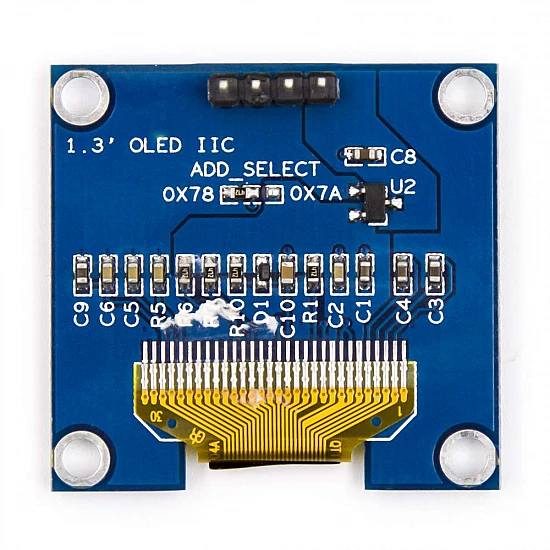
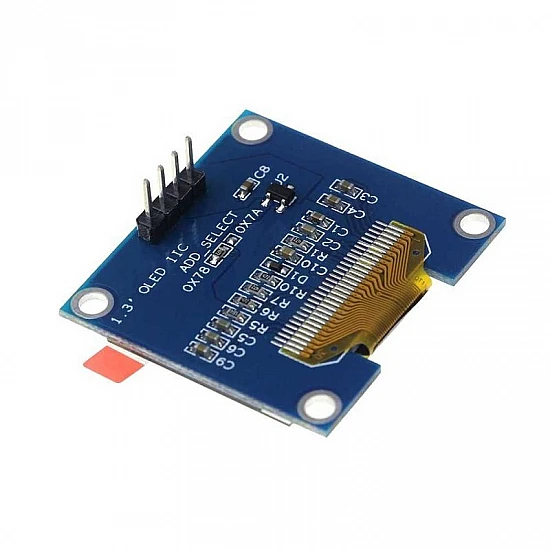
🔧 1.3 Inch OLED Display (Blue) 128×64 – Large High-Resolution I2C/SPI Monochrome Display Module
The 1.3 Inch OLED Display (Blue) 128×64 is a large, high-resolution organic light-emitting diode display featuring 128×64 pixel resolution with vibrant blue illumination and superior readability. Based on the SH1106 driver chip, this self-illuminating display offers 35% more viewing area than 0.96″ models while maintaining the same resolution, delivering exceptional visibility in all lighting conditions with 160° wide viewing angles. Featuring I2C or SPI interface options, ultra-low power consumption, excellent contrast ratio, and full graphics capability, this display is perfect for professional projects, industrial displays, automotive dashboards, medical devices, instrumentation, and applications requiring maximum readability in compact form. Compatible with Arduino, ESP32, Raspberry Pi, and most microcontrollers.
✨ Key Highlights
- 📺 128×64 Pixel Resolution – 8192 individually addressable pixels
- 📏 Large 1.3″ Screen – 35% bigger than 0.96″ displays
- 💙 Vibrant Blue OLED – Self-illuminating, excellent visibility
- 👁️ Superior Readability – Larger pixels, easier to read from distance
- 📡 Dual Interface – I2C (4-wire) or SPI (7-wire) selectable
- ⚡ Ultra Low Power – ~20-40mA typical (pixel-dependent)
- 💡 Pure Black Background – Infinite contrast ratio, crisp display
- 🔧 SH1106 Driver – Reliable controller, good library support
- 💻 Full Graphics – Text, shapes, bitmaps, animations, icons
- 💰 Great Value – $8-12, largest affordable OLED option
📊 Technical Specifications
| 📺 Display Type | Organic LED (OLED), monochrome blue |
| 📏 Screen Size | 1.3 inch diagonal (33mm) |
| 📊 Resolution | 128×64 pixels (8192 total) |
| 📐 Active Area | ~29.42×14.7mm display area (35% larger than 0.96″) |
| 💙 Color | Blue monochrome (single color) |
| 💻 Driver IC | SH1106 (128×64 native, 132×64 internal) |
| 📡 Interface | I2C (4-pin) or SPI (7-pin) – selectable |
| 🔌 I2C Address | 0x3C (default) or 0x3D (configurable) |
| ⚡ Operating Voltage | 3.3V – 5V DC (onboard regulator) |
| 🔋 Current Draw | ~20-40mA @ 5V (depends on displayed pixels) |
| 👁️ Viewing Angle | >160° (all directions, no color shift) |
| 📊 Contrast Ratio | >2000:1 (OLED technology) |
| 🌡️ Operating Temp | -40°C to +70°C |
| 📏 Module Size | ~35×33mm (varies by manufacturer) |
| ⚖️ Weight | ~5-8 grams |
🔌 Pin Configuration
| I2C Mode (4-pin) | Connection | Notes |
| GND | Ground (0V) | Connect to microcontroller GND |
| VCC (or VDD) | Power Supply | Connect to 3.3V or 5V |
| SCL (or SCK) | I2C Clock | Connect to microcontroller SCL pin |
| SDA | I2C Data | Connect to microcontroller SDA pin |
| SPI Mode (7-pin) | Connection | Notes |
| GND | Ground | Power ground |
| VCC | Power Supply | 3.3V or 5V |
| SCL (or CLK) | SPI Clock | Serial clock signal |
| SDA (or MOSI) | SPI Data | Master out, slave in |
| RES (or RST) | Reset | Hardware reset pin |
| DC (or D/C) | Data/Command | Data or command select |
| CS (or SS) | Chip Select | SPI slave select |
🎯 Perfect For
- 🏭 Industrial Displays – Control panels, machine interfaces
- 🚗 Automotive Projects – Dashboard displays, diagnostics
- ⚕️ Medical Devices – Patient monitors, portable equipment
- 📊 Instrumentation – Measurement devices, test equipment
- 🤖 Professional Robotics – Robot status displays, telemetry
- 💻 Desktop Projects – PC monitors, system stats displays
- 🏠 Home Automation – Control panels, smart home displays
- 📡 IoT Devices – Large display for WiFi/network projects
🆚 OLED Display Size Comparison
| Feature | 0.96″ 128×64 | 1.3″ 128×64 | 2.42″ 128×64 |
| Screen Size | 0.96″ diagonal | ✅ 1.3″ diagonal | 2.42″ diagonal |
| Active Area | ~26.7×19.3mm | ✅ ~29.4×14.7mm | ~55×30mm |
| Resolution | 128×64 pixels | ✅ 128×64 pixels | 128×64 pixels |
| Pixel Size | Smaller | ✅ Larger (better readability) | Largest |
| Driver IC | SSD1306 | ✅ SH1106 | SSD1309 |
| Power Draw | ~15-30mA | ~20-40mA | ~30-60mA |
| Price | $4-8 | ✅ $8-12 | $15-25 |
| Best For | Compact projects | ✅ Readability priority | Maximum visibility |
✅ Key Advantages
- 📏 35% Larger Display – Same resolution as 0.96″, bigger pixels
- 👁️ Superior Readability – Easier to read from greater distance
- 💙 Vibrant Blue OLED – High contrast, eye-catching display
- 💡 Self-Illuminating – Perfect blacks, infinite contrast ratio
- ⚡ Low Power – 20-40mA, excellent for battery projects
- 🔌 Dual Interface – I2C (simple) or SPI (faster) options
- 🎨 Full Graphics – Text, shapes, bitmaps, animations, icons
- 👁️ Wide Viewing Angle – 160°+ visible from all directions
- 💻 Good Library Support – U8g2, Adafruit libraries work well
- 🏭 Professional Grade – Used in commercial/industrial products
⚠️ Important Limitations
- 🎨 Monochrome Only – Single blue color, no multi-color
- 💰 Higher Cost – $8-12 vs $4-8 for 0.96″ displays
- ⏱️ OLED Lifespan – ~10,000-20,000 hours (degrades over time)
- 🔥 Burn-In Risk – Static images cause permanent ghosting
- 📏 Larger Footprint – ~35×33mm vs 27×27mm for 0.96″
- ⚡ Higher Power Draw – Uses more current than smaller displays
- 🔧 SH1106 Driver – Slightly different than SSD1306 (U8g2 better)
- 💾 More Memory – Uses more RAM buffer than smaller displays
🔧 Arduino Connection Guide (I2C Mode)
| OLED Pin | Arduino Uno | Arduino Mega | ESP32 | ESP8266 |
| GND | GND | GND | GND | GND |
| VCC | 5V or 3.3V | 5V or 3.3V | 3.3V | 3.3V |
| SCL | A5 | 21 (SCL) | GPIO 22 | D1 (GPIO 5) |
| SDA | A4 | 20 (SDA) | GPIO 21 | D2 (GPIO 4) |
💻 Arduino Code Example (U8g2 Library – Recommended)
| 1.3″ OLED Display with U8g2 | |
|
#include <U8g2lib.h> #include <Wire.h> // Constructor for SH1106 1.3″ display (I2C) void setup() { void loop() { |
🎨 Graphics Capabilities
| Text Display | Multiple fonts (built-in U8g2 fonts), sizes up to 24px |
| Geometric Shapes | Lines, rectangles, circles, triangles, rounded corners, arcs |
| Bitmaps/Icons | Full bitmap support up to 128×64, XBM format |
| Pixel Control | Individual pixel drawing for custom graphics |
| Animations | Frame-by-frame animations, smooth transitions |
| Scrolling | Text scrolling, marquee effects |
| Fonts | 100+ built-in fonts in U8g2 library |
| UTF-8 Support | International characters, symbols, icons |
📊 Text Display Capacity
| 6×10 Font (Small) | 21 characters × 6 lines (maximum density) |
| 8×13 Font (Medium) | 16 characters × 5 lines (readable) |
| 10×20 Font (Large) | 12 characters × 3 lines (clear, bold) |
| 14×24 Font (Extra Large) | 9 characters × 2 lines (prominent) |
| Mixed Fonts | Combine different sizes for visual hierarchy |
🔍 Troubleshooting Guide
| Blank Display | Check I2C address (0x3C or 0x3D), verify power/wiring |
| Display Not Found | Run I2C scanner, check SDA/SCL connections, try 3.3V |
| 2-Pixel Offset | Normal for SH1106 (132×64 internal), use U8g2 library |
| Wrong Library | Use U8g2 with SH1106 constructor, not SSD1306 |
| Partial Display | Verify correct SH1106 initialization in code |
| Flickering | Clear buffer before updates, check power supply stability |
| Dim Display | OLED aging, use setContrast() to adjust brightness |
| Won’t Compile | Install U8g2 library via Arduino Library Manager |
💡 Pro Tips for 1.3″ OLED
- 📚 Use U8g2 Library – Best support for SH1106, more fonts, efficient
- 🎨 Larger Fonts – Take advantage of bigger screen, use 12-18pt fonts
- 👁️ Distance Viewing – Perfect for displays 1-2 meters away
- 🔄 Prevent Burn-In – Vary content, use screen timeout after 30-60s
- ⚡ Power from 3.3V – Lower power consumption than 5V
- 📊 Visual Hierarchy – Mix font sizes for better information structure
- 🎨 Icons + Text – Use large icons (24×24 or 32×32) for clarity
- 💾 Check RAM – Full buffer mode uses more memory than page mode
🎓 Example Projects
- 🌡️ Weather Dashboard – Large temp/humidity display with icons
- 📊 System Monitor – PC stats (CPU, RAM, network) display
- 🚗 Car Dashboard – Speed, RPM, temp, fuel gauges
- 💓 Health Monitor – Heart rate, SpO2, blood pressure display
- 📈 Stock Ticker – Real-time stock prices with graphs
- 🏭 Machine Interface – Industrial control panel display
- ⏱️ Smart Clock – Large time/date display with weather
- 🎵 Audio Visualizer – Spectrum analyzer, VU meters
🎨 Sensor Dashboard Example
| Multi-Sensor Display Interface | |
|
void displayDashboard(float temp, float hum, int pres) { u8g2.clearBuffer(); // Title u8g2.setFont(u8g2_font_ncenB10_tr); u8g2.drawStr(25, 12, “Weather Station”); // Temperature (large) u8g2.setFont(u8g2_font_ncenB18_tr); u8g2.setCursor(10, 35); u8g2.print(temp, 1); u8g2.print(“C”); // Humidity u8g2.setFont(u8g2_font_ncenB10_tr); u8g2.setCursor(10, 50); u8g2.print(“Humidity: “); u8g2.print(hum, 0); u8g2.print(“%”); // Pressure u8g2.setCursor(10, 63); u8g2.print(“Press: “); u8g2.print(pres); u8g2.print(“hPa”); u8g2.sendBuffer(); } |
📦 Installing U8g2 Library
| Method | Arduino IDE → Tools → Manage Libraries → Search “U8g2” |
| Library Name | U8g2 by olikraus (recommended for SH1106) |
| Alternative | Adafruit_SH110X library (newer, less tested) |
| Constructor | U8G2_SH1106_128X64_NONAME_F_HW_I2C |
| Documentation | https://github.com/olikraus/u8g2/wiki |
📦 Package Contents (Typical)
- ✅ 1x 1.3″ OLED Display Module 128×64 Blue (SH1106)
- ✅ 4-pin header for I2C (usually pre-soldered)
- ✅ 7-pin header for SPI (on some models, may need soldering)
- ✅ Blue monochrome OLED (vibrant display)
- ⚠️ Note: Jumper wires not included
- ⚠️ Note: Arduino/microcontroller sold separately
- ⚠️ Note: Some modules require header soldering
- ⚠️ Note: I2C default, SPI requires configuration
🔋 Power Consumption Analysis
| All Pixels OFF | ~15-20mA @ 5V (minimum, idle) |
| Typical Mixed Display | ~25-35mA @ 5V (text/graphics) |
| All Pixels ON | ~40-50mA @ 5V (maximum draw) |
| At 3.3V Operation | ~15-35mA (lower power recommended) |
| Sleep Mode | ~10-20µA (display off, circuit active) |
| Note | Larger than 0.96″ = more pixels = more power |
🔧 SH1106 vs SSD1306 Differences
| Feature | SH1106 (1.3″) | SSD1306 (0.96″) |
| Internal Resolution | 132×64 pixels | 128×64 pixels |
| Display Offset | 2 pixels horizontal offset | No offset |
| Library Support | ✅ U8g2 best, Adafruit works | ✅ Excellent (all libraries) |
| Common Screen Size | 1.3 inch displays | 0.96 inch displays |
| Initialization | Requires SH1106 specific code | Standard SSD1306 code |
| Best Library | U8g2 (handles offset automatically) | Adafruit or U8g2 |
💰 Cost & Value Analysis
| 1.3″ OLED 128×64 Blue | $8-12 (best readability) |
| 1.3″ OLED 128×64 White | $8-12 (same price, different color) |
| 0.96″ OLED 128×64 | $4-8 (smaller, cheaper) |
| 2.42″ OLED 128×64 | $15-25 (largest affordable) |
| Best Value | ✅ 1.3″ offers best readability/price balance |
⚙️ I2C vs SPI Interface
| Feature | I2C Mode | SPI Mode |
| Wiring | ✅ 4 wires (VCC, GND, SDA, SCL) | ⚠️ 7 wires (more complex) |
| Speed | ⚠️ Slower (100-400kHz) | ✅ Faster (up to 10MHz) |
| GPIO Pins Used | ✅ 2 pins (SDA, SCL) | ⚠️ 5 pins (MOSI, CLK, CS, DC, RST) |
| Setup | ✅ Simple, plug and play | ⚠️ More configuration needed |
| Best For | Most projects, simplicity | Fast animations, gaming |
🔧 Compatible Platforms
- ✅ Arduino – Uno, Nano, Mega, Leonardo, Due (all models)
- ✅ ESP8266 – NodeMCU, Wemos D1 Mini (WiFi projects)
- ✅ ESP32 – All variants (WiFi + Bluetooth)
- ✅ Raspberry Pi – All models (Python libraries)
- ✅ STM32 – Blue Pill, Black Pill (ARM Cortex)
- ✅ Teensy – All versions (high performance)
- ✅ PIC – Microchip microcontrollers
- ✅ MicroPython – ESP32, Raspberry Pi Pico
⏱️ OLED Lifespan & Care
| Expected Lifespan | ~10,000-20,000 hours continuous use |
| Blue OLED Notes | Blue may dim faster than white (monitor over time) |
| Burn-in Prevention | Avoid static content >10 min, vary display regularly |
| Screen Timeout | Power off display after 30-60 seconds idle |
| Contrast Adjust | u8g2.setContrast(value) – lower extends life |
| Pixel Saver | Slightly move static elements, use animations |
🎓 Design Best Practices
- 📊 Large Fonts – Use 12-18pt fonts to take advantage of screen size
- 🎨 Big Icons – 32×32 or 48×48 pixel icons look great
- 📏 Visual Hierarchy – Title (14pt), data (18pt), status (10pt)
- 👁️ High Contrast – Bold fonts, clear spacing for readability
- 📊 Data Visualization – Use graphs, progress bars, gauges
- 🎨 Whitespace – Don’t cram information, use spacing effectively
- 🔄 Animation – Smooth transitions between screens
- 💡 Professional Look – Consistent layout, aligned elements
🛡️ Product Information
✅ 1.3 Inch OLED Display Module – 128×64 Pixel Blue Monochrome
✅ Display technology: Organic LED (OLED), self-illuminating, no backlight
✅ Screen size: 1.3 inch diagonal (33mm), 35% larger than 0.96″ displays
✅ Active area: ~29.4×14.7mm display area (superior readability)
✅ Resolution: 128×64 pixels (8192 individually addressable pixels)
✅ Color: Blue monochrome (vibrant blue on black background)
✅ Driver IC: SH1106 (132×64 internal resolution, 2-pixel offset)
✅ Interface: I2C (4-wire: VCC, GND, SDA, SCL) or SPI (7-wire) selectable
✅ I2C address: 0x3C default (0x3D configurable via jumper)
✅ Operating voltage: 3.3V – 5V DC (onboard voltage regulator)
✅ Current consumption: ~20-40mA @ 5V (pixel-dependent, larger than 0.96″)
✅ Viewing angle: >160° all directions, no color shift
✅ Contrast ratio: >2000:1 (true OLED blacks, infinite contrast)
✅ Module size: ~35×33mm, Weight: ~5-8 grams
✅ Operating temperature: -40°C to +70°C
⚠️ Important: Best with U8g2 library for SH1106 driver. Arduino Uno: SDA=A4, SCL=A5. Constructor: U8G2_SH1106_128X64_NONAME_F_HW_I2C u8g2(U8G2_R0, U8X8_PIN_NONE). SH1106 has 2-pixel horizontal offset (132×64 internal) – U8g2 handles automatically. Text capacity: ~21 chars × 6 lines (6×10 font). Graphics capable: full bitmap support, 100+ fonts, shapes, animations. OLED lifespan: ~10,000-20,000 hours – avoid static content. Power depends on lit pixels (black=off, blue=on). Works with 3.3V or 5V (3.3V recommended for lower power). 35% larger viewing area than 0.96″ displays = better readability. Uses more RAM than smaller displays (full buffer = 1KB). Perfect for: Industrial displays, automotive dashboards, medical devices, instrumentation, professional projects. Not suitable for: Full-color needs, budget-critical projects (use 0.96″), very compact spaces. Best OLED size for readability vs cost!