
Description
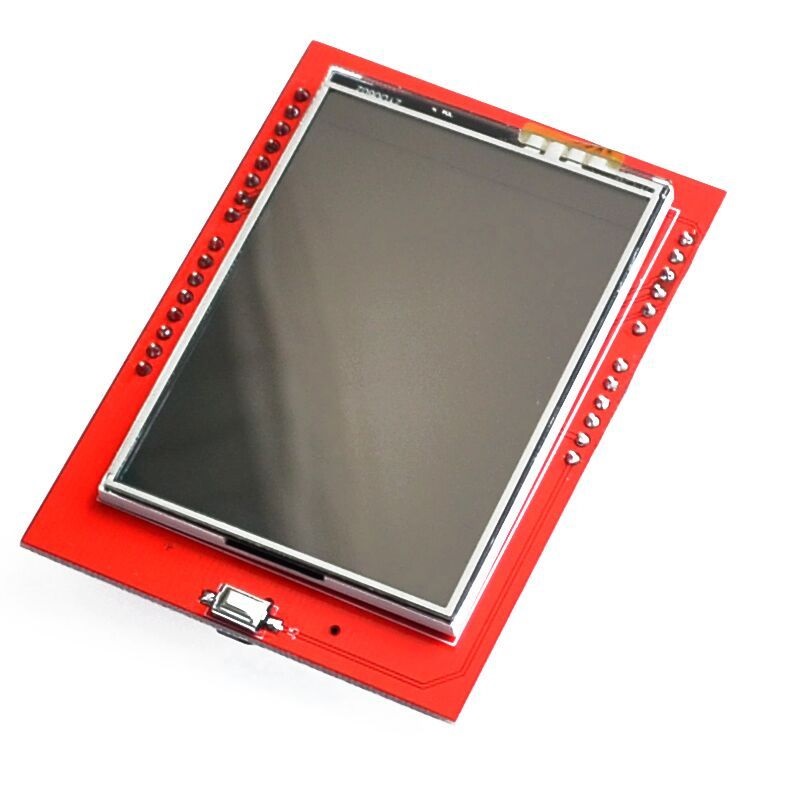
🔧 2.4 Inch TFT LCD Shield (For Arduino) – Full-Color Touchscreen Display Shield
The 2.4 Inch TFT LCD Shield for Arduino is a plug-and-play full-color touchscreen display shield featuring 240×320 pixel resolution with 262K vibrant colors and integrated resistive touch panel. Based on the ILI9341 driver chip, this shield directly mounts onto Arduino Uno/Mega boards, eliminating complex wiring while providing a professional-grade graphical interface. Featuring microSD card slot for image/data storage, 8/16-bit parallel interface for fast refresh rates, and comprehensive library support including touch calibration, this shield is perfect for GUI applications, control panels, data visualization, gaming, instrumentation displays, and Arduino projects requiring interactive color graphics. Compatible with Arduino Uno R3, Mega 2560, and compatible boards.
✨ Key Highlights
- 📺 2.4″ TFT Display – 240×320 pixel resolution (76,800 pixels)
- 🎨 262K Colors – 18-bit color depth, vibrant full-color display
- 👆 Resistive Touchscreen – 4-wire touch panel with stylus support
- 🔌 Shield Format – Direct plug onto Arduino Uno/Mega (no wiring!)
- 💾 MicroSD Card Slot – Store images, data, fonts on SD card
- ⚡ Fast Parallel Interface – 8/16-bit parallel for quick refresh
- 💻 ILI9341 Driver – Industry standard, excellent library support
- 📏 320×240 Landscape – Wide format perfect for dashboards
- 🔧 Library Support – Adafruit GFX, TFT_eSPI, UTFT libraries
- 💰 Great Value – $10-20, complete display solution
📊 Technical Specifications
| 📺 Display Type | TFT LCD (Thin-Film Transistor Liquid Crystal) |
| 📏 Screen Size | 2.4 inch diagonal (~61mm) |
| 📊 Resolution | 240×320 pixels (QVGA, 76,800 total) |
| 📐 Active Area | ~48.96×36.72mm display area |
| 🎨 Color Depth | 262K colors (18-bit RGB, 6-6-6) |
| 💻 Driver IC | ILI9341 or compatible (HX8347, ILI9325) |
| 👆 Touch Type | 4-wire resistive touchscreen |
| 📡 Interface | 8-bit or 16-bit parallel (shield pins) |
| ⚡ Operating Voltage | 5V DC (from Arduino) |
| 🔋 Current Draw | ~100-150mA @ 5V (backlight on) |
| 💡 Backlight | White LED, PWM dimmable (some models) |
| 💾 Storage | MicroSD card slot (SPI interface) |
| 🔌 Form Factor | Arduino Uno R3 shield compatible |
| 📏 Shield Size | ~69×54mm (Arduino Uno footprint) |
| ⚖️ Weight | ~25-35 grams |
🔌 Pin Usage (Arduino Uno Shield)
| Function | Arduino Pins Used | Notes |
| LCD Data (D0-D7) | Digital 8, 9, 2, 3, 4, 5, 6, 7 | 8-bit parallel data bus |
| LCD Control (CS) | Digital 10 (or A3) | Chip select |
| LCD Control (CD/RS) | Digital A2 | Command/data select |
| LCD Control (WR) | Digital A1 | Write strobe |
| LCD Control (RD) | Digital A0 | Read strobe |
| LCD Reset (RST) | Digital A4 | Hardware reset |
| SD Card (CS) | Digital 10 (shared) or 4 | SD chip select |
| SD Card (MOSI/MISO/SCK) | Digital 11, 12, 13 | SPI interface |
| Touch (YP, XM, YM, XP) | A1, A2, 6, 7 | Analog touch pins |
🎯 Perfect For
- 🎨 GUI Applications – Buttons, sliders, menus, control panels
- 📊 Data Visualization – Real-time graphs, charts, gauges
- 🌡️ Sensor Displays – Colorful multi-sensor readouts with graphics
- 🎮 Arduino Gaming – Simple games with touchscreen controls
- ⚙️ Control Interfaces – Machine controls, smart home panels
- 🔬 Educational Projects – STEM learning, Arduino workshops
- 📸 Image Display – Load and display BMP images from SD card
- 🏭 DIY Instruments – Oscilloscopes, data loggers, test equipment
🆚 TFT Shield vs Other Displays
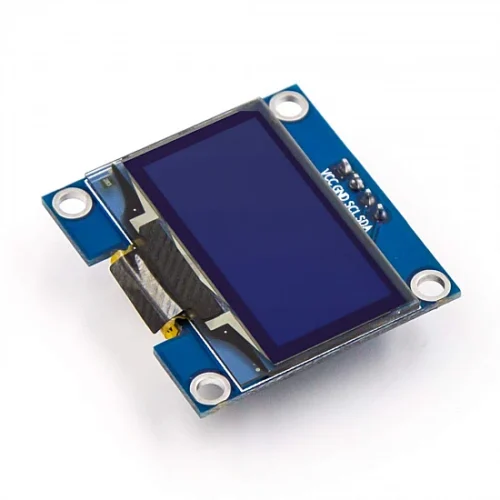
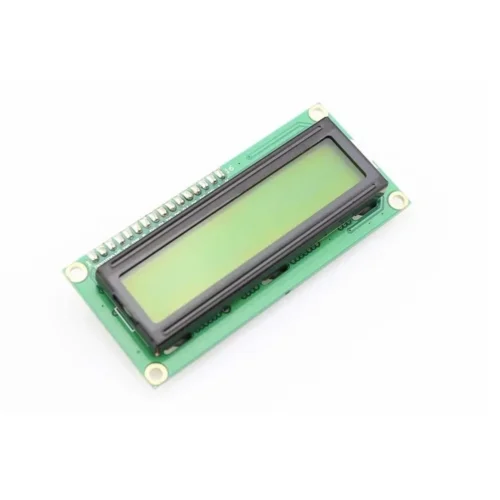
| Feature | 2.4″ TFT Shield | 0.96″ OLED | 16×2 LCD |
| Resolution | ✅ 240×320 (76,800 px) | 128×64 (8,192 px) | ⚠️ 32 chars (text only) |
| Colors | ✅ 262K full color | ⚠️ Monochrome | ⚠️ Monochrome |
| Touchscreen | ✅ Yes (resistive) | ❌ No | ❌ No |
| Graphics | ✅ Full graphics, images | ✅ Limited graphics | ❌ Text + 8 custom chars |
| Wiring | ✅ Shield (plug-in) | 4 wires (I2C) | 6+ wires (parallel) |
| Speed | ✅ Fast (parallel) | ⚠️ Moderate (I2C) | ⚠️ Slow (parallel) |
| Power | ⚠️ ~100-150mA | ✅ ~15-30mA | ⚠️ ~50-120mA |
| Price | 💰 $10-20 | ✅ $4-8 | ✅ $3-8 |
✅ Key Advantages
- 🔌 Plug & Play – Shield format, no wiring needed, instant setup
- 🎨 Full Color Display – 262K colors for vibrant graphics and images
- 👆 Touch Interface – Resistive touchscreen for interactive controls
- 📊 High Resolution – 240×320 pixels for detailed graphics
- 💾 SD Card Slot – Store and display images, save data
- ⚡ Fast Refresh – Parallel interface enables smooth animations
- 📚 Excellent Libraries – Adafruit GFX, TFT_eSPI, UTFT support
- 🎨 Graphics Capable – Shapes, text, images, icons, animations
- 🔧 Easy Installation – Just stack on Arduino, no soldering
- 💡 Bright Display – LED backlight, visible in various lighting
⚠️ Important Limitations
- 📌 Uses Most Pins – Parallel interface uses nearly all Arduino pins
- ⚡ Higher Power – 100-150mA, not ideal for battery projects
- 💾 Memory Intensive – Large graphics consume lots of RAM
- 🐌 Slower on Uno – 16MHz Arduino struggles with complex graphics
- 👆 Resistive Touch – Less responsive than capacitive, needs pressure
- 🔌 Uno/Mega Only – Not compatible with Nano, ESP32 without adaptation
- 📏 Limited Stacking – Few pins left for other shields
- 💰 More Expensive – Costs more than OLED or character LCDs
💻 Arduino Code Example (Adafruit Library)
| Basic TFT Shield Setup | |
|
#include <Adafruit_GFX.h> #include <MCUFRIEND_kbv.h> // Or Adafruit_TFTLCD MCUFRIEND_kbv tft; // Color definitions (RGB565 format) void setup() { void loop() { |
👆 Touchscreen Example Code
| Reading Touch Input | |
|
#include <TouchScreen.h>
// Touch pin definitions (varies by shield) // Touch calibration values TouchScreen ts = TouchScreen(XP, YP, XM, YM, 300); void loop() { |
🎨 Graphics Capabilities
| Text Display | Multiple fonts, sizes 1-5, custom fonts, rotatable |
| Geometric Shapes | Lines, rectangles, circles, triangles, rounded corners |
| Images | Display BMP files from SD card, custom bitmaps |
| Colors | 262,144 colors (RGB565: 5-6-5 bit color) |
| Fill Functions | Solid fills, gradient fills (custom code) |
| Pixels | Individual pixel control (drawPixel) |
| Screen Rotation | 0°, 90°, 180°, 270° rotation support |
| Animations | Frame-by-frame animations, sprite movement |
🎓 Example Projects
- 🌡️ Weather Station – Colorful display with graphs and icons
- 🎮 Arduino Games – Pong, Snake, Breakout with touch controls
- 📊 Data Logger – Real-time graphs from sensors
- 🏠 Smart Home Panel – Touch control interface for home automation
- ⚙️ Machine Interface – Industrial control panel with buttons
- 📈 Stock Ticker – Live stock prices with color-coded changes
- 💓 Health Monitor – Heart rate, SpO2 with waveform display
- 🎵 Music Player – MP3 player interface with album art
🔍 Troubleshooting Guide
| White Screen | Check shield seated properly, verify readID() returns valid code |
| Black Screen | Check backlight connection, verify 5V power supply adequate |
| Wrong Colors | Driver mismatch – try different library (MCUFRIEND vs Adafruit) |
| Inverted Display | Adjust setRotation() or use display inversion commands |
| Touch Not Working | Calibrate touchscreen, verify touch pin definitions match shield |
| Touch Inaccurate | Run calibration sketch, adjust TS_MIN/MAX values |
| SD Card Fails | Check CS pin definition, format card as FAT32, use quality card |
| Slow Graphics | Normal for Uno (16MHz), consider Mega or optimize code |
💡 Pro Tips
- 📚 Use MCUFRIEND_kbv – Better auto-detection than Adafruit for shields
- 🎨 RGB565 Colors – Use online converter for custom colors
- 👆 Calibrate Touch – Run calibration sketch first for accurate touch
- 📊 Optimize Graphics – Reduce redraws, update only changed areas
- 💾 SD Card Images – Store large images on SD, load as needed
- 🔄 Use Landscape – setRotation(1) gives 320×240 wide format
- ⚡ Arduino Mega – Much faster than Uno for complex graphics
- 🎨 Pre-calculate Graphics – Store complex shapes in arrays
📦 Installing Arduino Libraries
| Required Libraries | Adafruit_GFX + MCUFRIEND_kbv (or Adafruit_TFTLCD) |
| Touch Library | TouchScreen library (Adafruit) |
| Installation | Arduino IDE → Manage Libraries → Search library names |
| Alternative | TFT_eSPI (faster, more configuration needed) |
| SD Card | SD library (built-in Arduino), Adafruit_ImageReader |
📦 Package Contents (Typical)
- ✅ 1x 2.4″ TFT LCD Shield for Arduino (ILI9341 or compatible)
- ✅ Resistive touchscreen panel (integrated)
- ✅ MicroSD card slot (on shield)
- ✅ LED backlight (white, integrated)
- ✅ Arduino Uno R3 compatible headers
- ⚠️ Note: Arduino board sold separately (Uno or Mega)
- ⚠️ Note: MicroSD card not included
- ⚠️ Note: Stylus may or may not be included
- ⚠️ Note: Some shields require header soldering
🔋 Power Consumption
| Backlight ON (Full) | ~100-150mA @ 5V |
| Backlight Dimmed | ~50-80mA @ 5V (if PWM control available) |
| Backlight OFF | ~20-30mA @ 5V (display logic only) |
| Total System | Arduino (~50mA) + Shield (~100-150mA) = ~150-200mA |
| Power Supply | USB (500mA) adequate, wall adapter (1A) recommended |
💰 Cost & Value Analysis
| 2.4″ TFT Shield (ILI9341) | $10-15 (good quality) |
| 2.4″ TFT Shield (Generic) | $8-12 (budget option) |
| 2.8″ TFT Shield | $12-18 (larger screen, same resolution) |
| 3.5″ TFT Shield | $15-25 (largest shield option) |
| Best Value | ✅ 2.4″ offers best size/price/compatibility |
🔧 Compatible Arduino Boards
- ✅ Arduino Uno R3 – Perfect fit, most common (slow for graphics)
- ✅ Arduino Mega 2560 – Best performance, same shield fits
- ✅ Arduino Leonardo – Compatible, same footprint
- ⚠️ Arduino Due – 3.3V board, may need level shifters
- ❌ Arduino Nano – Different form factor, not shield compatible
- ❌ ESP32/ESP8266 – Not shield compatible (use breakout boards)
- ❌ Raspberry Pi – Different platform entirely
📊 Display Modes & Orientation
| setRotation(0) | Portrait: 240×320 (tall) |
| setRotation(1) | ✅ Landscape: 320×240 (wide, most common) |
| setRotation(2) | Portrait Inverted: 240×320 |
| setRotation(3) | Landscape Inverted: 320×240 |
💾 SD Card Usage
| Supported Format | FAT16 or FAT32 (exFAT not supported) |
| Max Card Size | 32GB recommended (larger may work) |
| Image Format | 24-bit BMP (uncompressed, RGB888) |
| Data Logging | Text files, CSV data logging supported |
| File Access | Standard Arduino SD library functions |
🎨 Creating Custom Graphics
- 🖼️ BMP Images – Create 320×240 or 240×320 BMP, save to SD card
- 🎨 Color Format – Use RGB565 converter for code colors
- 📐 Icon Design – Design 32×32 or 48×48 icons for buttons
- 💻 Image2Code Tools – Convert images to C arrays online
- 🎨 Graphics Software – GIMP, Photoshop, Paint.NET for design
- 📊 Font Generation – Use font tools for custom text styles
⚙️ Performance Optimization
- 🚀 Use Mega – Arduino Mega significantly faster than Uno
- 📊 Reduce Redraws – Only update changed screen regions
- 🎨 Simple Graphics – Avoid complex gradients, use solid colors
- 💾 Minimize RAM – Use PROGMEM for large graphics arrays
- 📦 SD for Images – Store large images on SD card, not in RAM
- ⚡ Batch Operations – Group multiple draw commands together
- 🔄 Double Buffering – Not possible (limited RAM), use partial updates
🛡️ Product Information
✅ 2.4 Inch TFT LCD Shield for Arduino – Full-Color Touchscreen Display
✅ Display type: TFT LCD (Thin-Film Transistor Liquid Crystal Display)
✅ Screen size: 2.4 inch diagonal (~61mm), Active area: ~48.96×36.72mm
✅ Resolution: 240×320 pixels (QVGA, 76,800 total pixels)
✅ Color depth: 262,144 colors (18-bit RGB, RGB565 format)
✅ Driver IC: ILI9341 or compatible (HX8347, ILI9325 variants)
✅ Touch type: 4-wire resistive touchscreen (stylus/finger pressure)
✅ Interface: 8-bit or 16-bit parallel (uses most Arduino pins)
✅ Operating voltage: 5V DC (powered from Arduino)
✅ Current consumption: ~100-150mA @ 5V (backlight on, full brightness)
✅ Backlight: White LED, some models support PWM dimming
✅ MicroSD card: Slot included, FAT16/FAT32, up to 32GB
✅ Form factor: Arduino Uno R3 shield (69×54mm footprint)
✅ Weight: ~25-35 grams
⚠️ Important: Requires Adafruit_GFX + MCUFRIEND_kbv libraries (or Adafruit_TFTLCD). TouchScreen library needed for touch input. Uses nearly all Arduino Uno pins (D2-D13, A0-A5). Compatible with Arduino Uno R3, Mega 2560, Leonardo. NOT compatible with Nano, ESP32, Raspberry Pi without modifications. Arduino Mega recommended for better performance (faster graphics). Touch calibration required – run calibration sketch first. SD card must be FAT16/FAT32 format. BMP images: 24-bit uncompressed format. Power: USB adequate for testing, 1A wall adapter recommended. Display modes: Portrait (240×320) or Landscape (320×240). RGB565 color format: 5 bits red, 6 bits green, 5 bits blue. Shield format = no wiring! Just plug onto Arduino. Perfect for: GUI applications, games, data visualization, control panels, instrumentation. Not suitable for: Battery projects (high power), pin-limited applications, ESP32 projects. Best Arduino display solution for full-color touchscreen!