🔧 FlySky FS-i6 2.4GHz 6-Channel Transmitter & Receiver – Digital Proportional Radio System
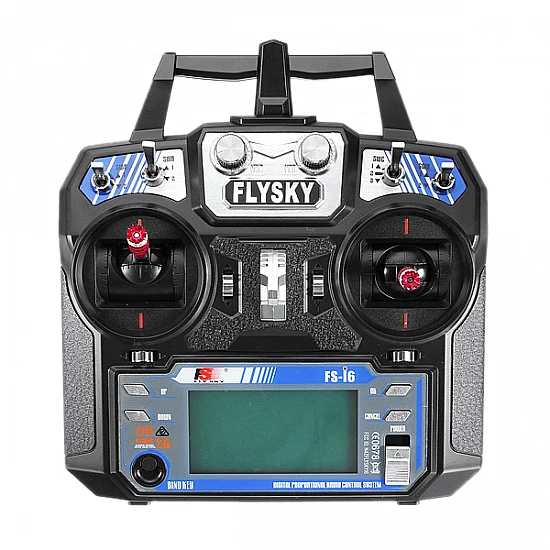
The FlySky FS-i6 2.4GHz 6-Channel Transmitter & Receiver is an advanced, feature-rich radio control system designed for RC aircraft, helicopters, drones, and quadcopters. Featuring 2.4GHz AFHDS 2A (Enhanced Automatic Frequency Hopping) technology, this combo delivers interference-free operation with improved range and signal stability. The ergonomic transmitter includes large backlit LCD screen, 20 model memory, USB firmware updates, timer functions, and rechargeable AA batteries, while the compact FS-iA6B receiver offers 6 PWM channels plus IBUS/PPM output. Perfect for intermediate pilots, FPV racing drones, aerial photography platforms, and hobbyists seeking professional features at budget-friendly pricing.
✨ Key Highlights
- 📡 AFHDS 2A Protocol – Enhanced frequency hopping, superior range
- 🎮 6-Channel Control – Full proportional control (expandable to 10)
- 📺 Large Backlit LCD – Clear display with blue backlight
- 💾 20 Model Memory – Store settings for 20 different aircraft
- 🔌 IBUS/PPM Output – Single-wire connection to flight controllers
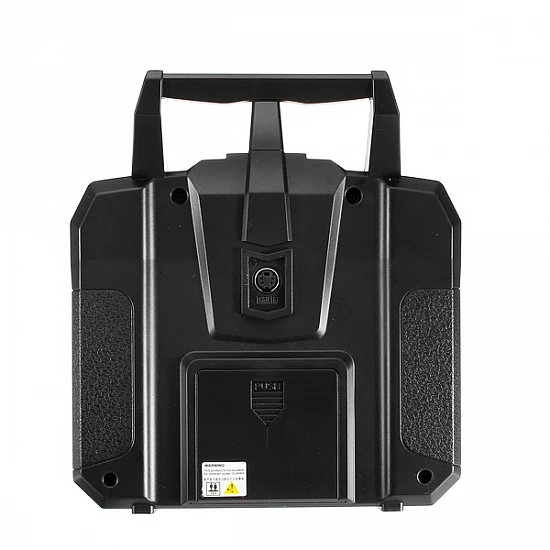
- 🔋 AA Battery Compatible – 4× AA rechargeable (1800mAh included)
- 💻 USB Firmware Updates – Updateable via computer
- 📊 Telemetry Ready – Optional sensor support (FS-CVT01, FS-TM01)
- 📏 Extended Range – ~1km+ with proper antenna setup
- 💰 Best Value – Professional features, affordable price
📊 Transmitter (FS-i6) Specifications
| 📡 Frequency |
2.4GHz ISM band |
| 🔄 Protocol |
AFHDS 2A (Enhanced) |
| 🎮 Channels |
6 channels (expandable to 10 with mods) |
| 📏 Range |
~1km+ (open area, proper setup) |
| 🔋 Battery |
4× AA NiMH 1800mAh (rechargeable, included) |
| ⚡ Battery Life |
~8-10 hours typical use |
| 🔌 Charging |
USB charging cable (included) |
| ⏱️ Charge Time |
~4-6 hours |
| 💾 Model Memory |
20 model settings storage |
| 📺 Display |
Large LCD with blue backlight |
| 💻 USB Port |
Firmware updates, simulator support |
| ⚖️ Weight |
~480 grams (with batteries) |
| 🌡️ Operating Temp |
-10°C to +60°C |
📊 Receiver (FS-iA6B) Specifications
| 📡 Frequency |
2.4GHz ISM band |
| 🔄 Protocol |
AFHDS 2A compatible |
| 🎮 PWM Channels |
6 channels independent output |
| 🔌 IBUS Output |
10 channels via single wire (digital) |
| 📡 PPM Output |
8 channels via single wire (analog) |
| ⚡ Operating Voltage |
4.0V – 8.4V DC |
| 🔋 Current Draw |
~30mA @ 5V |
| 📏 Dimensions |
47×26.2×15mm |
| ⚖️ Weight |
~14.9 grams |
| 🔌 Output Types |
PWM (1520μs neutral) + IBUS/PPM |
| 📊 Resolution |
4096 steps (12-bit) |
| 🛡️ Failsafe |
Programmable per channel |
| 📡 Telemetry |
IBUS telemetry support (with sensors) |
🆚 FS-i6 vs CT6B Comparison
| Feature |
FS-i6 |
CT6B |
| Protocol |
✅ AFHDS 2A (newer) |
AFHDS (older) |
| Model Memory |
✅ 20 models |
5 models |
| IBUS/PPM |
✅ Yes (FS-iA6B) |
❌ PWM only |
| USB Updates |
✅ Yes |
❌ No |
| Telemetry |
✅ Optional sensors |
❌ No |
| Battery Type |
✅ AA rechargeable |
Built-in NiMH |
| Range |
✅ ~1km+ |
~500-800m |
| Price |
Moderate |
✅ Lower |
🎯 Perfect For
- 🚁 FPV Racing Drones – 250-650mm frames with F4/F7 FCs
- 📹 Aerial Photography – Stable camera platforms, gimbals
- ✈️ RC Airplanes – Sport and trainer aircraft
- 🚁 Helicopters – Fixed and collective pitch helicopters
- 🎮 Quadcopters – With Betaflight, iNav, Cleanflight FCs
- 🏫 Intermediate Pilots – Upgrading from basic transmitters
- 💻 Simulator Training – USB connection for PC simulators
- 💰 Budget-Conscious Builds – Pro features without high cost
🎮 Channel Configuration
| Channel 1 |
Aileron (Roll) – Right stick left/right |
| Channel 2 |
Elevator (Pitch) – Right stick up/down |
| Channel 3 |
Throttle – Left stick up/down |
| Channel 4 |
Rudder (Yaw) – Left stick left/right |
| Channel 5 |
AUX1 – Switch SWA (3-position) |
| Channel 6 |
AUX2 – Switch SWB/SWC/SWD (assignable) |
🔧 Advanced Transmitter Features
| 20 Model Memory |
Store settings for 20 different models |
| Timer Functions |
Up/down timer with audio alarm |
| Dual Rate/Expo |
3 rates per axis with exponential curves |
| Servo Reverse |
Reverse direction per channel |
| Sub Trim |
Fine-tune neutral position (-125 to +125) |
| End Point Adjust |
Limit servo travel 0-125% per side |
| 6 Programmable Mixes |
Elevator-flap, aileron-rudder, V-tail, etc. |
| Stick Calibration |
Calibrate gimbal endpoints |
| Display Backlight |
Adjustable brightness, auto-off timer |
| Audio Settings |
Beep volume, key tones, warnings |
| USB Simulator |
Connect to PC flight simulators |
| Firmware Updates |
Update via USB from FlySky website |
🔌 FS-iA6B Receiver Output Modes
| PWM Mode |
6 independent channels, standard servo output |
| PPM Mode |
8 channels via CH1 port (analog sum signal) |
| IBUS Mode |
10 channels via SERVO port (digital protocol) |
| SBUS Output |
Via mod/adapter (not native) |
✅ Key Advantages
- 📡 AFHDS 2A Protocol – Better range, stronger signal than AFHDS
- 💾 20 Model Memory – Switch between aircraft without reprogramming
- 🔌 IBUS/PPM Support – Single wire to FC, cleaner installation
- 💻 USB Updateable – Future firmware improvements
- 🔋 AA Battery System – Easy replacement, standard batteries
- 📺 Large LCD Display – Clear, backlit, easy to read
- 🎮 6 Programmable Mixes – Advanced flight characteristics
- 📊 Telemetry Ready – Add voltage/temp sensors (optional)
- 🎯 Simulator Support – Practice on PC before flying
- 💰 Excellent Value – Pro features at budget price
⚠️ Important Notes
- 🔋 Charge Before Use – Included batteries need initial charge
- 🎮 Mode 2 Default – Throttle on left stick (Mode 1 available)
- 🔌 IBUS One-Wire – Simplifies FC wiring (single signal wire)
- 📡 Antenna Position – Keep RX antenna straight, avoid bending
- 🔧 Bind Required – Must bind TX and RX before first use
- 💻 Firmware Updates – Check FlySky website for latest version
- 🛡️ Set Failsafe – Critical for safety (throttle cut on signal loss)
- 📏 Range Test First – Always range check before each flight
🔧 Binding Procedure
| 1. Power Off TX |
Ensure transmitter is turned off |
| 2. Connect Bind Plug |
Insert bind plug into FS-iA6B BIND port |
| 3. Power Receiver |
Connect 5V power, LED flashes rapidly (red) |
| 4. Power On TX |
Turn on FS-i6 transmitter |
| 5. LED Solid Red |
Receiver LED solid = binding successful |
| 6. Remove Bind Plug |
Disconnect bind plug from receiver |
| 7. Power Cycle |
Turn off/on RX and TX to confirm binding |
| 8. Test Channels |
Verify all channels respond correctly |
🔌 IBUS Connection to Flight Controller
| RX IBUS Pin |
→ FC UART RX (any available UART) |
| RX 5V/VCC |
→ FC 5V output |
| RX GND |
→ FC GND |
| FC Configuration |
Set UART to Serial RX, Protocol: IBUS |
| Advantage |
All 10 channels via single wire (clean install) |
🔍 Troubleshooting
| No Binding |
Check bind plug position, verify TX powered on |
| Red LED Flashing |
No signal – check TX on, re-bind if needed |
| Weak Range |
Extend antenna fully, keep vertical orientation |
| IBUS Not Working |
Check FC UART config, verify RX to TX connection |
| Servo Jitter |
Use clean 5V power, check BEC quality |
| Battery Drains Fast |
Turn off backlight, reduce volume, charge fully |
| USB Not Detected |
Install FlySky USB drivers from official website |
💡 Pro Tips
- 🔋 Use Quality Batteries – Good NiMH AAs last 8-10 hours
- 🔌 Use IBUS – Cleaner wiring than 6 separate PWM wires
- 💻 Update Firmware – Check FlySky site for improvements
- 🛡️ Set Failsafe Properly – Throttle to 0%, other channels neutral
- 📊 Use Model Memory – Separate settings per aircraft
- 🎮 Practice on Simulator – USB mode for PC flight sims
- 📡 Antenna Orientation – Perpendicular for best signal strength
- ⚖️ Balance Dual Rates – Low for beginners, high for experts
🔧 Failsafe Configuration
| 1. Setup Menu |
Go to TX System Setup → Failsafe |
| 2. Move Sticks |
Position sticks to desired failsafe positions |
| 3. Set Throttle |
Throttle stick to minimum (motor off) |
| 4. Confirm Settings |
Press OK to save failsafe to receiver |
| 5. Test |
Turn off TX, verify throttle cuts off |
💻 USB Simulator Setup
| 1. Download Drivers |
Install FlySky USB drivers from website |
| 2. Connect USB |
Connect FS-i6 to PC via USB cable |
| 3. Power On TX |
Turn on transmitter |
| 4. Launch Simulator |
Open FPV Freerider, Phoenix, RealFlight, etc. |
| 5. Calibrate |
Calibrate sticks in simulator settings |
| 6. Practice |
Fly without risk of crashes! |
📦 Package Contents
- ✅ 1x FlySky FS-i6 Transmitter (Mode 2)
- ✅ 1x FlySky FS-iA6B Receiver (6-channel + IBUS/PPM)
- ✅ 4x AA NiMH Rechargeable Batteries (1800mAh)
- ✅ 1x USB Charging Cable (for AA batteries)
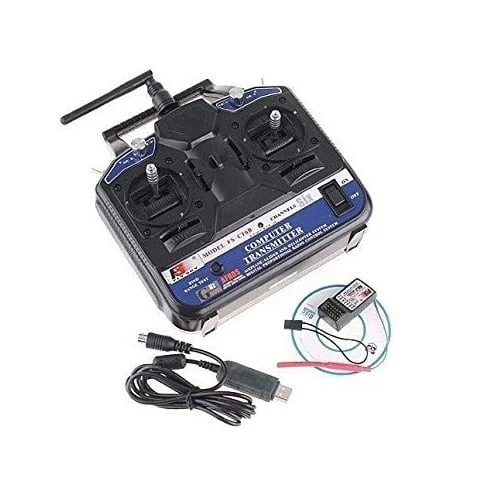
- ✅ 1x USB Data Cable (firmware updates/simulator)
- ✅ 1x Bind Plug
- ✅ 1x User Manual (English)
- ⚠️ Note: Servos sold separately
- ⚠️ Note: Aircraft/drone sold separately
- ⚠️ Note: Telemetry sensors sold separately (optional)
🎓 Example FPV Quad Setup (FS-i6)
- 🚁 Frame – 250-450mm racing/freestyle frame
- 🎮 Flight Controller – F4/F7 with Betaflight/iNav
- 📡 Receiver – FS-iA6B in IBUS mode
- 🔌 Connection – Single wire from RX IBUS to FC UART
- 🎮 Channel 1-4 – AETR flight control
- 🎮 Channel 5 – Arm/disarm switch (SWA)
- 🎮 Channel 6 – Flight mode switch (angle/horizon/acro)
- ✅ Result – Clean install, 6+ channels available
📊 Optional Telemetry Sensors
| FS-CVT01 |
Voltage sensor – displays battery voltage on TX |
| FS-TM01 |
Temperature sensor – monitors ESC/motor temp |
| Connection |
Via IBUS sensor port on FS-iA6B |
| Display |
Real-time data shown on TX LCD screen |
🔧 Compatible Flight Controllers
- ✅ Betaflight F4/F7 – Full IBUS support, 10 channels
- ✅ iNav F4/F7 – GPS navigation, waypoints (IBUS)
- ✅ Cleanflight – Older firmware, IBUS supported
- ✅ CC3D/Atom – Via PPM input (8 channels)
- ✅ KK 2.1.5 – Via PWM (6 channels only)
- ✅ Pixhawk/APM – Via PPM or PWM inputs
- ✅ Naze32 – IBUS or PPM support
🆚 FS-i6 vs FS-i6X/FS-i6S
| Model |
Channels |
Features |
| FS-i6 |
6 (10 via IBUS) |
Standard, 20 models, telemetry ready |
| FS-i6X |
10 native |
More channels, improved ergonomics |
| FS-i6S |
10 native |
Touchscreen, advanced telemetry |
🔋 Battery Care & Charging
| Initial Charge |
4-6 hours before first use (full cycle) |
| Regular Charging |
After flying or when low battery warning |
| Charge Time |
4-6 hours via USB cable |
| Battery Life |
8-10 hours typical flying (backlight off) |
| Storage |
Charge every 2-3 weeks if not in use |
| Replacement |
Standard AA NiMH 1800-2500mAh batteries |
🛡️ Product Information
✅ FlySky FS-i6 2.4GHz 6-Channel Transmitter & Receiver Combo
✅ AFHDS 2A enhanced protocol – superior range and signal stability
✅ Transmitter: 6 channels, large backlit LCD, USB updates
✅ Receiver: FS-iA6B with 6 PWM + IBUS (10ch) + PPM (8ch) outputs
✅ Range: 1km+ in open areas with proper antenna setup
✅ Model memory: Store 20 different aircraft configurations
✅ Battery: 4× AA NiMH 1800mAh rechargeable (8-10 hours runtime)
✅ Features: Dual rate, expo, 6 mixes, timer, failsafe, telemetry ready
✅ USB connectivity: Firmware updates + PC flight simulator support
✅ Receiver: 4-8.4V input, IBUS/PPM/PWM outputs, 14.9g weight
✅ Compatible with: Betaflight, iNav, Cleanflight, Pixhawk, APM, CC3D
✅ Mode 2 standard (throttle left stick) – Mode 1 available
✅ Includes: TX, RX, batteries, USB cables, bind plug, manual
⚠️ Important: Requires binding before first use. Charge AA batteries 4-6 hours initially. IBUS provides 10 channels via single wire (recommended for modern FCs). PPM provides 8 channels via single wire. PWM provides 6 independent channels. Set failsafe to cut throttle for safety. Range test before each flight session. FS-iA6B receiver needs 4-8.4V power (5V typical from FC/BEC). Update firmware from FlySky official website for improvements. Optional telemetry sensors (FS-CVT01 voltage, FS-TM01 temperature) sold separately. USB simulator mode works with FPV Freerider, Phoenix RC, RealFlight, and other simulators.