
Description
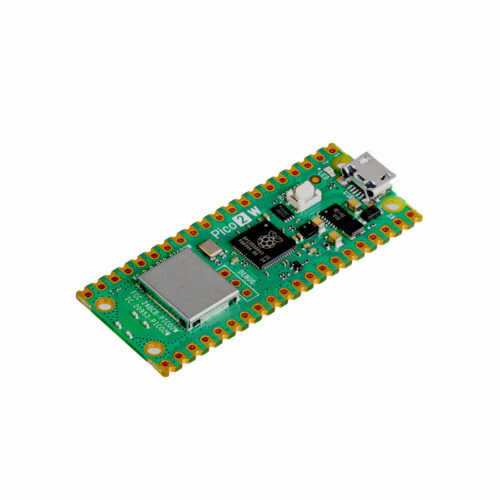
🔧 Raspberry Pi Pico W – Wireless Microcontroller Board with WiFi & Bluetooth
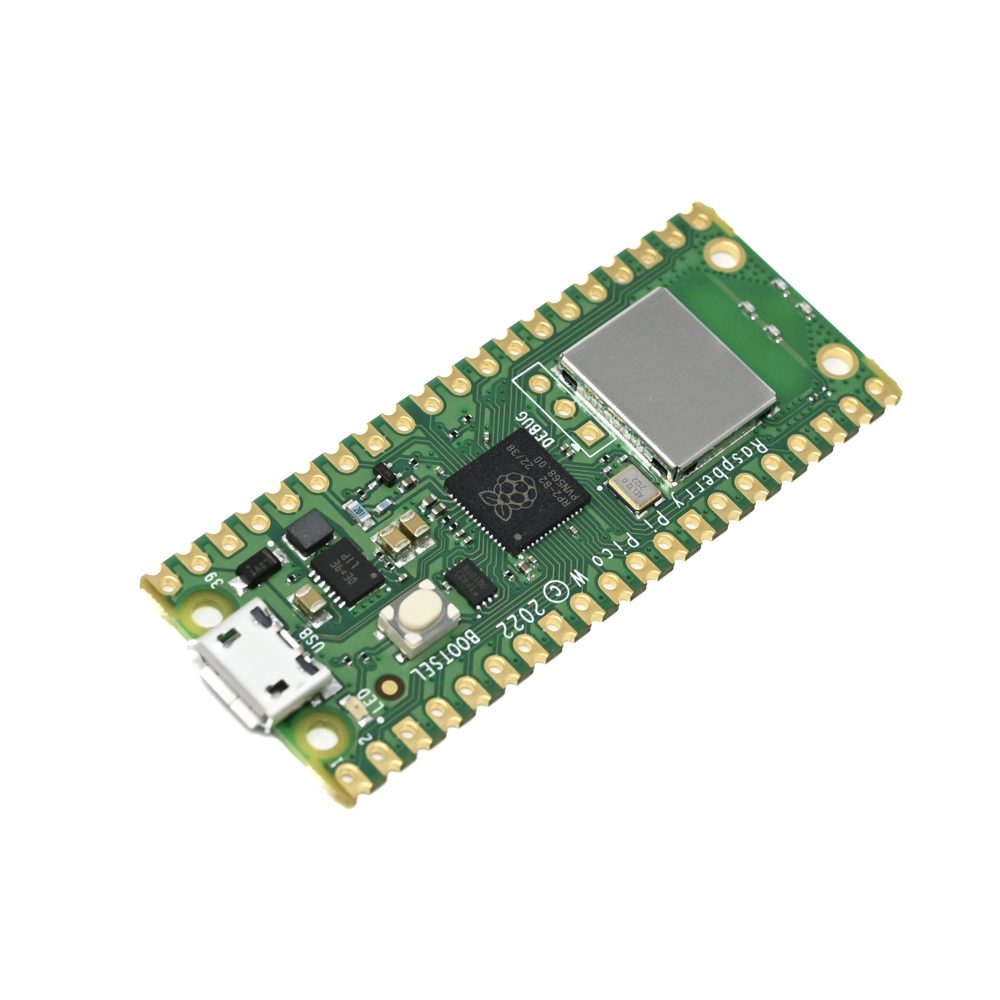
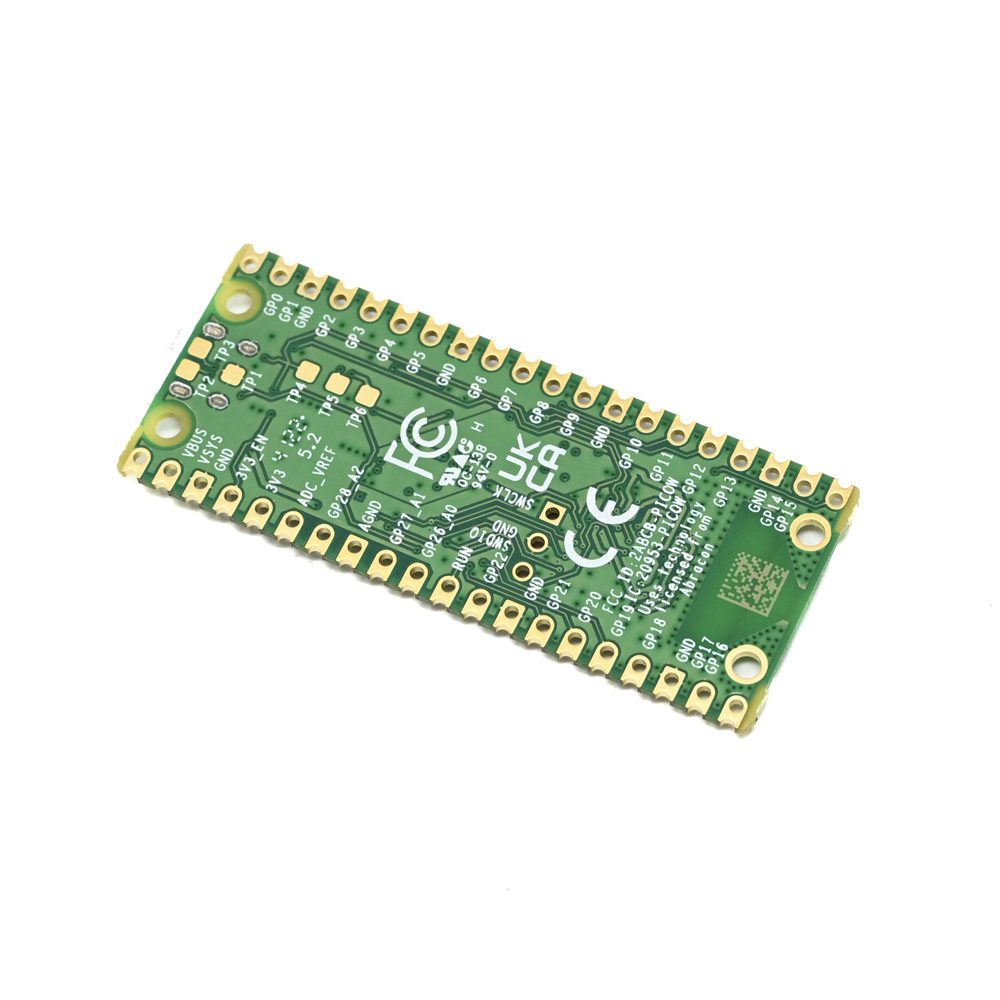
The Raspberry Pi Pico W is a powerful, affordable wireless microcontroller board featuring the RP2040 chip with dual-core ARM Cortex-M0+ processors running at 133MHz, 264KB RAM, and integrated 2.4GHz wireless connectivity (WiFi 4 and Bluetooth 5.2). Building on the success of the original Pico, the Pico W adds WiFi and Bluetooth capabilities while maintaining the same compact 51×21mm form factor and pinout compatibility. With 26 GPIO pins (3 analog inputs), dual UART, dual SPI, dual I2C, 16 PWM channels, and programmable I/O (PIO) for custom interfaces, this board is perfect for IoT projects, wireless sensors, home automation, robotics, wearables, data logging, and embedded systems requiring wireless connectivity at an unbeatable price point of just $6 USD. Fully compatible with MicroPython, C/C++, and Arduino IDE.
✨ Key Highlights
- ⚡ Dual-Core RP2040 – 2× ARM Cortex-M0+ @ 133MHz
- 💾 264KB RAM – On-chip SRAM for program execution
- 📡 Built-in WiFi – 2.4GHz 802.11n wireless (Infineon CYW43439)
- 📱 Bluetooth 5.2 – Bluetooth Low Energy (BLE) support
- 💾 2MB Flash – Onboard QSPI flash memory for program storage
- 🔌 26 GPIO Pins – Highly flexible multifunction I/O
- 📊 3 Analog Inputs – 12-bit ADC (500ksps)
- ⚡ 16 PWM Channels – Precise motor control, LED dimming
- 🎨 Programmable I/O – Unique PIO for custom protocols
- 💰 Only $6 USD – Incredible value for wireless microcontroller
📊 Technical Specifications
| 💻 Microcontroller | RP2040 (Raspberry Pi silicon) |
| 🔧 CPU | Dual-core ARM Cortex-M0+ @ 133MHz (overclockable to ~250MHz) |
| 💾 SRAM | 264KB on-chip SRAM |
| 💾 Flash Memory | 2MB onboard QSPI flash (W25Q16JV) |
| 📡 Wireless Chip | Infineon CYW43439 (WiFi + Bluetooth) |
| 📡 WiFi | 2.4GHz IEEE 802.11n (WiFi 4), single-band |
| 📱 Bluetooth | Bluetooth 5.2, Bluetooth Low Energy (BLE) |
| 🔌 GPIO Pins | 26× multifunction GPIO pins |
| 📊 ADC | 3× 12-bit ADC channels (500ksps, 0-3.3V) |
| ⚡ PWM | 16× PWM channels (8 slices, 2 channels each) |
| 🔌 UART | 2× UART interfaces |
| 📡 SPI | 2× SPI interfaces |
| 📡 I2C | 2× I2C interfaces |
| 🎨 PIO | 8× Programmable I/O state machines |
| ⚡ Operating Voltage | 1.8V – 5.5V (3.3V logic levels) |
| 🔋 Power Input | 5V via micro USB or VSYS pin (1.8-5.5V) |
| 🔋 Current Draw | ~50-100mA typical (WiFi active), ~1mA sleep mode |
| 🌡️ Operating Temp | -20°C to +85°C |
| 📏 Dimensions | 51mm × 21mm × 1mm (excluding headers) |
| ⚖️ Weight | ~3 grams (bare board) |
🔌 Pin Configuration & Features
| GPIO 0-25 | 26× general-purpose I/O pins (3.3V logic) |
| ADC 0-2 (GPIO 26-28) | 3× analog input pins (12-bit, 0-3.3V) |
| ADC_VREF | ADC voltage reference (typically 3.3V) |
| UART0/UART1 | TX/RX on configurable GPIO pins |
| SPI0/SPI1 | MOSI/MISO/SCK/CS on configurable pins |
| I2C0/I2C1 | SDA/SCL on configurable GPIO pins |
| PWM 0-7 | 16 PWM channels (any GPIO can be PWM) |
| 3V3_EN | Enable pin for 3.3V regulator |
| VSYS | System voltage input (1.8-5.5V) |
| VBUS | USB 5V input (when powered via USB) |
| GND | 8× ground pins distributed around board |
| RUN | Reset pin (pull low to reset) |
| BOOTSEL | Boot mode button (hold during power-on) |
🎯 Perfect For
- 📡 IoT Sensors – WiFi-enabled temperature, humidity, air quality sensors
- 🏠 Home Automation – Smart switches, lights, blinds, thermostats
- 📊 Data Logging – Wireless sensor networks, environmental monitoring
- 🤖 WiFi Robotics – Remote-controlled robots, drones, vehicles
- 📱 BLE Devices – Bluetooth sensors, wearables, beacons
- 🌡️ Weather Stations – WiFi weather data collection and reporting
- 💡 Smart Lighting – WiFi LED strips, smart bulbs, addressable LEDs
- 🔔 Notification Systems – Alert systems, status indicators, displays
🆚 Pico W vs Other Microcontrollers
| Feature | Pico W | Pico (Original) | ESP32 | Arduino Uno WiFi |
| CPU Cores | ✅ 2 @ 133MHz | 2 @ 133MHz | ✅ 2 @ 240MHz | 1 @ 16MHz |
| RAM | 264KB | 264KB | ✅ 520KB | 2KB |
| WiFi | ✅ 2.4GHz 802.11n | ❌ No | ✅ 2.4GHz 802.11n | ✅ 2.4GHz |
| Bluetooth | ✅ BLE 5.2 | ❌ No | ✅ BLE 4.2/5.0 | ❌ No |
| GPIO Pins | 26 pins | 26 pins | 34 pins | 14 pins |
| ADC | 3× 12-bit | 3× 12-bit | ✅ 18× 12-bit | 6× 10-bit |
| PIO | ✅ Yes (unique) | ✅ Yes (unique) | ❌ No | ❌ No |
| Price | ✅ $6 | ✅ $4 | $8-15 | $40+ |
✅ Key Advantages
- 💰 Incredibly Affordable – Only $6 for WiFi + BLE microcontroller
- ⚡ Fast Dual-Core – 133MHz ARM Cortex-M0+ processors
- 📡 WiFi + Bluetooth – Both wireless protocols in one chip
- 🎨 Unique PIO – Programmable I/O for custom interfaces
- 💾 Ample Memory – 264KB RAM, 2MB flash storage
- 🔌 Flexible GPIO – 26 multifunction pins, highly configurable
- 🐍 MicroPython Native – Excellent MicroPython support
- 💻 C/C++ SDK – Professional development with Pico SDK
- 🎓 Arduino Compatible – Works with Arduino IDE
- 📚 Great Documentation – Official guides, tutorials, examples
⚠️ Important Limitations
- 📡 2.4GHz WiFi Only – No 5GHz band support
- 🔌 3.3V Logic – Not 5V tolerant (requires level shifters)
- 📊 Only 3 ADC – Limited analog inputs vs ESP32
- 🔊 No Built-in DAC – Use PWM or external DAC for analog output
- 💾 No Native USB Host – USB OTG requires software implementation
- 🔧 Soldering May Be Needed – Headers not pre-soldered
- ⚡ Lower Speed Than ESP32 – 133MHz vs 240MHz
- 📡 WiFi/BLE Still Developing – Some features still being added
💻 Programming Languages & Environments
| MicroPython | ✅ Official support, easiest for beginners, interactive REPL |
| C/C++ (Pico SDK) | ✅ Official SDK, maximum performance, professional development |
| Arduino IDE | ✅ Community support via Earle Philhower’s core |
| CircuitPython | ✅ Adafruit’s variant of MicroPython, hardware abstraction |
| Rust | ✅ Growing support, memory-safe embedded programming |
| TinyGo | ✅ Go language for embedded systems |
🐍 MicroPython Quick Start
| Installing MicroPython & Basic WiFi Example | |
|
# 1. Download MicroPython firmware # Visit: micropython.org/download/rp2-pico-w/ # Download latest .uf2 file # 2. Install firmware # 3. Connect with Thonny IDE import network # Connect to WiFi # Wait for connection print(‘Connected!’) |
🎓 Example Projects
- 🌡️ WiFi Temperature Logger – DHT22 sensor posting data to cloud
- 💡 Smart LED Controller – WiFi-controlled WS2812B LED strips
- 🏠 Home Automation Node – MQTT sensor/actuator for smart home
- 📊 Web Server Dashboard – Display sensor data via built-in web page
- 🤖 WiFi Robot – Remote-controlled robot via web interface
- 🔔 Notification Display – OLED display showing API data/notifications
- 📱 BLE Beacon – Bluetooth proximity detection, location tracking
- ⏱️ NTP Clock – Network time synchronized digital clock
📡 WiFi Capabilities & Performance
| WiFi Standard | IEEE 802.11n (WiFi 4), 2.4GHz single-band |
| Security | WPA2, WPA3 (firmware dependent) |
| Connection Speed | ~5-10 seconds typical connection time |
| Data Rate | Up to 72Mbps theoretical (typical ~20-40Mbps) |
| Range | ~15-30m indoors (depends on environment) |
| Power Modes | Active, power save, deep sleep supported |
| TCP/IP Stack | lwIP (lightweight IP) included in firmware |
📱 Bluetooth Capabilities
| Bluetooth Version | Bluetooth 5.2, Bluetooth Low Energy (BLE) |
| BLE Roles | Central, Peripheral, Broadcaster, Observer |
| Range | ~10-30m typical for BLE (line of sight) |
| Profiles | GATT, GAP, custom services supported |
| Use Cases | Sensors, beacons, wearables, remote controls |
| Note | Classic Bluetooth not supported (BLE only) |
🔍 Troubleshooting Guide
| Not Recognized by PC | Try different USB cable (must be data cable, not charge-only) |
| Won’t Enter BOOTSEL | Hold BOOTSEL before connecting USB, keep holding until drive appears |
| WiFi Won’t Connect | Check SSID/password, verify 2.4GHz network, check firmware version |
| WiFi Disconnects | Power supply issue – use quality 5V adapter, check USB cable |
| Bluetooth Not Working | Ensure latest firmware, BLE only (no classic Bluetooth) |
| GPIO Not Working | Check if pin shared with WiFi (GPIO 23, 24, 25, 29 used by WiFi) |
| Overheating | Normal – RP2040 + WiFi chip can get warm (~50-60°C) |
| Code Upload Fails | Disconnect, hold BOOTSEL, reconnect, try again |
💡 Pro Tips for Pico W
- 📡 WiFi Power Management – Disable WiFi when not needed to save power
- 🔋 Use VSYS Pin – Power from 3.7V LiPo battery via VSYS (not USB)
- 🌡️ Built-in Temperature – RP2040 has internal temp sensor (ADC channel 4)
- ⚡ Overclock Safely – Can run at 200-250MHz if properly coded
- 📚 Use Both Cores – Take advantage of dual-core for parallel tasks
- 🎨 Leverage PIO – Use PIO for LED strips, displays, custom protocols
- 💾 Save to Flash – Use littlefs or save files to 2MB flash storage
- 🔌 Solder Headers – Pre-solder GPIO headers for easier prototyping
📦 Package Contents
- ✅ 1× Raspberry Pi Pico W board
- ⚠️ Note: Board only – no USB cable included
- ⚠️ Note: GPIO headers not pre-soldered (bare board)
- ⚠️ Note: Micro USB cable required (data cable, not charge-only)
- ⚠️ Tip: Consider Pico W H variant with pre-soldered headers
- ⚠️ Tip: Get official Pico W kit with cables and headers
🔋 Power Consumption Details
| Sleep Mode (Deep) | ~0.8-1mA @ 3.3V (WiFi disabled) |
| Idle (WiFi Disabled) | ~20-30mA @ 5V |
| Active (WiFi Connected) | ~50-100mA @ 5V (typical) |
| Active (WiFi TX/RX) | ~100-200mA @ 5V (peak) |
| Active (BLE Only) | ~30-50mA @ 5V (typical) |
| Recommended PSU | 5V 1A USB adapter or quality USB port |
💰 Pricing & Availability
| Raspberry Pi Pico W | $6 USD (official MSRP) |
| Raspberry Pi Pico W H | $7 USD (with pre-soldered headers) |
| Raspberry Pi Pico (original) | $4 USD (no wireless) |
| Header Pins (40-pin) | $1-2 (if soldering yourself) |
| Debug Probe | $12 USD (optional, for advanced debugging) |
🔧 Compatible Accessories
- 📺 Displays – SSD1306 OLED, ST7735 TFT, character LCDs via I2C/SPI
- 🌡️ Sensors – DHT22, BME280, BMP180, ultrasonic, PIR motion
- 💡 LEDs – WS2812B (NeoPixel), APA102, addressable LED strips
- 🔊 Audio – I2S DAC modules, DFPlayer Mini MP3 player
- ⚙️ Motors – L298N H-bridge, servo motors, stepper drivers
- 📡 Communication – LoRa modules, nRF24L01+ (via SPI)
- ⌨️ Input – Rotary encoders, buttons, keypads, joysticks
- 🔋 Power – LiPo batteries, UPS modules, solar panels
🎨 Programmable I/O (PIO) Capabilities
| PIO Blocks | 2 independent PIO blocks (PIO0, PIO1) |
| State Machines | 8 total (4 per PIO block) |
| Use Cases | WS2812B LEDs, VGA output, DVI, custom protocols |
| Speed | Up to system clock speed (133MHz default) |
| Advantage | Offloads timing-critical tasks from CPU cores |
| Learning | Requires PIO assembly, but examples available |
💻 Development Tools
- 🐍 Thonny IDE – Best for MicroPython, beginner-friendly
- 💻 VS Code – Pico SDK extension, professional development
- 🔧 Arduino IDE 2.0 – Familiar Arduino environment
- 📊 CMake – Official build system for Pico SDK (C/C++)
- 🔍 OpenOCD – Debugging via SWD (with Debug Probe)
- 📱 Pico Go – VS Code extension for MicroPython
📚 Learning Resources
- 📖 Official Documentation – datasheets.raspberrypi.com/picow/
- 📘 Getting Started Guide – Free PDF from Raspberry Pi
- 💻 Pico SDK – github.com/raspberrypi/pico-sdk
- 🐍 MicroPython Guide – micropython.org/download/rp2-pico-w/
- 🎓 Example Projects – Extensive collection on GitHub
- 🌐 Community Forums – forums.raspberrypi.com
🛡️ Product Information
✅ Raspberry Pi Pico W – Wireless Microcontroller Board with WiFi & Bluetooth
✅ Manufacturer: Raspberry Pi Ltd (official product)
✅ Microcontroller: RP2040 (Raspberry Pi silicon, dual-core ARM Cortex-M0+)
✅ CPU: 2× ARM Cortex-M0+ cores @ 133MHz (overclockable to ~250MHz)
✅ RAM: 264KB on-chip SRAM (six independent banks)
✅ Flash: 2MB onboard QSPI flash (W25Q16JV from Winbond)
✅ Wireless: Infineon CYW43439 chip (WiFi + Bluetooth)
✅ WiFi: 2.4GHz IEEE 802.11n (WiFi 4), WPA2/WPA3 security
✅ Bluetooth: Bluetooth 5.2, BLE only (no classic Bluetooth)
✅ GPIO: 26× multifunction GPIO pins (3.3V logic, NOT 5V tolerant)
✅ ADC: 3× 12-bit 500ksps ADC (GPIO 26-28), plus internal temperature sensor
✅ PWM: 16 PWM channels (8 slices × 2 channels each)
✅ Interfaces: 2× UART, 2× SPI, 2× I2C (all on configurable GPIO pins)
✅ PIO: 8× Programmable I/O state machines (unique RP2040 feature)
✅ USB: Micro USB (device mode, USB 1.1 full-speed)
✅ Power: 5V via USB or 1.8-5.5V via VSYS pin
✅ Dimensions: 51mm × 21mm × 1mm (excluding headers)
✅ Weight: ~3 grams (bare board without headers)
⚠️ Important: Official MSRP $6 USD (Pico W), $7 USD (Pico W H with headers). Headers NOT pre-soldered on standard Pico W – requires soldering or buy Pico W H variant. 3.3V logic only – NOT 5V tolerant (use level shifters for 5V devices). WiFi: 2.4GHz only (no 5GHz), supports WPA2/WPA3. Bluetooth: BLE 5.2 only (no classic Bluetooth for audio streaming). GPIO note: Pins 23, 24, 25, 29 used by wireless chip – limited availability. Programming: MicroPython (easiest), C/C++ SDK (fastest), Arduino IDE (familiar). Bootloader: Hold BOOTSEL button while connecting USB to enter bootloader mode. BOOTSEL appears as USB drive – drag .uf2 firmware file to install. Power: USB or VSYS pin (ideal for 3.7V LiPo battery). Current: ~50-100mA WiFi active, ~1mA deep sleep. Temperature: Internal sensor available via ADC channel 4. PIO advantage: Custom hardware interfaces (WS2812B, VGA, DVI) without CPU load. Community: Massive support, thousands of projects, extensive documentation. Perfect for: IoT sensors, home automation, WiFi robots, BLE devices, data logging, smart lighting. Not suitable for: 5GHz WiFi needs, classic Bluetooth audio, 5V logic projects (without level shifters). Best value wireless microcontroller available!