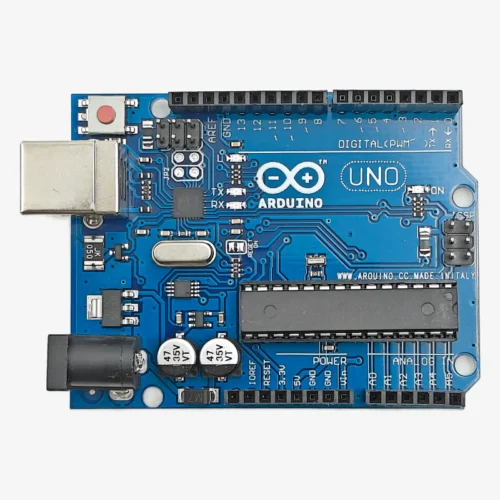
Description
🔧 Arduino Nano – ATmega328P Compact Microcontroller Board with USB
The Arduino Nano is a compact, breadboard-friendly microcontroller development board based on the ATmega328P chip. Measuring just 45mm × 18mm, this board features 14 digital I/O pins (6 with PWM), 8 analog inputs, 16MHz clock speed, and built-in USB programming. Perfect for space-constrained projects, prototyping, robotics, and embedded systems where the Arduino Uno is too large.
✨ Key Highlights
- 📐 Compact Size – 45mm × 18mm breadboard-friendly
- 💻 ATmega328P – Same chip as Arduino Uno
- 🔌 Built-in USB – Mini-B/Micro-USB programming
- ⚡ 16 MHz Clock – Fast real-time processing
- 📌 14 Digital I/O – 6 with PWM capability
- 📊 8 Analog Inputs – More than Uno (A0-A7)
- 💾 32 KB Flash – Ample program storage
- 🍞 Breadboard Ready – Perfect DIP-30 fit
- 💰 Affordable – Low cost with USB included
- 🔓 Arduino Compatible – All Uno code works
📊 Technical Specifications
| 💻 Microcontroller |
ATmega328P |
| ⚡ Operating Voltage |
5V DC |
| 🔋 Input Voltage |
7-12V (VIN) |
| ⏱️ Clock Speed |
16 MHz |
| 💾 Flash Memory |
32 KB |
| 🧠 SRAM |
2 KB |
| 💿 EEPROM |
1 KB |
| 📌 Digital I/O |
14 (6 PWM) |
| 📊 Analog Input |
8 pins (10-bit) |
| 🔌 USB Type |
Mini-B/Micro-USB |
| 📏 Dimensions |
45×18mm |
| ⚖️ Weight |
7 grams |
📌 Pin Configuration
| Digital I/O |
D0-D13 (14 pins) |
| PWM Output |
D3,D5,D6,D9,D10,D11 |
| Analog Input |
A0-A7 (8 pins) |
| Serial UART |
RX(D0), TX(D1) |
| I2C Bus |
SDA(A4), SCL(A5) |
| SPI Bus |
D10,D11,D12,D13 |
| Interrupts |
D2(INT0), D3(INT1) |
| Power Pins |
VIN,5V,3.3V,GND |
🎯 Perfect For
- 🍞 Breadboard Prototyping – Perfect fit for quick development
- 🤖 Robotics Projects – Compact robots, sensor arrays
- 🏠 Home Automation – Smart sensors, IoT devices
- 📊 Data Logging – Environmental monitoring, sensors
- 💡 LED Projects – NeoPixels, matrices, displays
- 🎓 Education – STEM learning, workshops
- 🔊 Audio Projects – MIDI controllers, synthesizers
- 📦 Embedded Systems – Space-limited installations
🔧 Getting Started
| 1. Install IDE |
Download Arduino IDE from arduino.cc |
| 2. Drivers |
Install CH340G drivers for clones |
| 3. Connect |
Plug via Mini-B/Micro-USB cable |
| 4. Board |
Tools → Board → Arduino Nano |
| 5. Processor |
Select ATmega328P (Old Bootloader) |
| 6. Port |
Choose correct COM/serial port |
| 7. Upload |
Load Blink example and upload |
✅ Key Advantages
- 🍞 Breadboard Friendly – Perfect DIP-30 spacing, no extra wiring
- 🔌 Built-in USB – No FTDI adapter needed unlike Pro Mini
- 📊 8 Analog Inputs – 2 more than Arduino Uno (A0-A7)
- 📐 Compact Size – Much smaller than Uno, same functionality
- 💰 Affordable – Great value with integrated USB programmer
- ⚙️ Uno Compatible – Same ATmega328P chip, all code works
- 🔧 Easy Programming – Simple plug-and-upload via USB
- 📚 Massive Support – Same community as Arduino Uno
⚠️ Important Notes
- 🔧 Old Bootloader – Most clones require “Old Bootloader” selection in IDE
- 🔌 CH340G Drivers – Clone boards need CH340G drivers installed
- 💡 Current Limits – Maximum 40mA per I/O pin
- ⚡ Voltage Protection – Never exceed 5V on I/O pins
- 🔋 Power Options – USB (5V) or VIN pin (7-12V recommended)
- 📌 Serial Pins – Avoid D0/D1 during USB communication
- 🔌 USB Cable Type – Verify Mini-B or Micro-USB version
- 🛡️ External Power – Use VIN for motors/servos, not USB
🔋 Power Supply Options
| USB Power |
5V from computer – programming & testing |
| VIN Pin |
7-12V regulated – external power projects |
| 5V Pin |
5V direct – bypass regulator (pre-regulated) |
| 9V Battery |
Portable projects via VIN (optimal) |
| Power Bank |
USB 5V – rechargeable portable power |
🔍 Troubleshooting
| Board Not Detected |
Install CH340G drivers from manufacturer |
| Upload Failed |
Select “Old Bootloader” in Processor menu |
| USB Issues |
Try different USB cable or computer port |
| Wrong COM Port |
Disconnect/reconnect to identify port |
| Code Won’t Run |
Check power LED, manually press reset |
💡 Pro Tips
- 🔧 Old Bootloader Setting – Essential for most clone boards
- 🍞 Breadboard Placement – Insert across center gap for easy access
- 📌 Label Your Pins – Print reference diagram for quick lookup
- 🔌 VIN for Heavy Loads – Use external power for motors
- 💾 Test Before Deploying – Prototype fully on breadboard first
- 📦 Buy Spares – Very affordable – keep backup boards
- 🛡️ Use IC Socket – Makes board replacement easier
- 📚 Use Uno Tutorials – All Arduino Uno guides work on Nano
🆚 Arduino Nano vs Uno vs Pro Mini
| Feature |
Nano |
Uno |
Pro Mini |
| Size |
45×18mm |
69×53mm |
33×18mm |
| USB Onboard |
✅ Yes |
✅ Yes |
❌ No |
| Breadboard Fit |
✅ Perfect |
❌ Too wide |
✅ Perfect |
| Analog Pins |
8 |
6 |
8 |
| Best For |
Breadboard |
Learning |
Production |
📦 Package Contents
- ✅ 1x Arduino Nano Development Board (headers pre-soldered)
- ✅ 1x USB Cable (Mini-B or Micro-USB, varies by version)
- ⚠️ Note: Breadboard, jumper wires, sensors sold separately
- ⚠️ Note: External power supply (7-12V) sold separately if needed
🛡️ Product Information
✅ Arduino Nano – ATmega328P Compact Development Board with USB
✅ Ultra-compact size: 45mm × 18mm – perfect breadboard fit
✅ Built-in USB programming (Mini-B or Micro-USB) – no FTDI needed
✅ 14 digital I/O pins (6 PWM) + 8 analog inputs (A0-A7)
✅ 16 MHz clock speed, 32 KB flash, 2 KB SRAM, 1 KB EEPROM
✅ UART, I2C, SPI communication protocols
✅ USB-to-Serial: FT232RL (original) or CH340G (clone)
✅ DIP-30 pin layout – standard 0.1″ breadboard compatible
✅ Multiple power options: USB (5V), VIN (7-12V), or 5V pin
✅ Arduino IDE compatible – same code as Arduino Uno
✅ Pre-soldered headers – ready to use immediately
✅ 3.3V and 5V output pins available for sensors
⚠️ Important: Most clones require “ATmega328P (Old Bootloader)” selection in Arduino IDE. Install CH340G drivers for clone boards. Max 40mA per I/O pin. Never exceed 5V on I/O pins. USB provides 500mA max – use VIN (7-12V) for motors/servos. Avoid using D0/D1 during USB serial communication. Verify USB cable type (Mini-B or Micro-USB) before ordering.