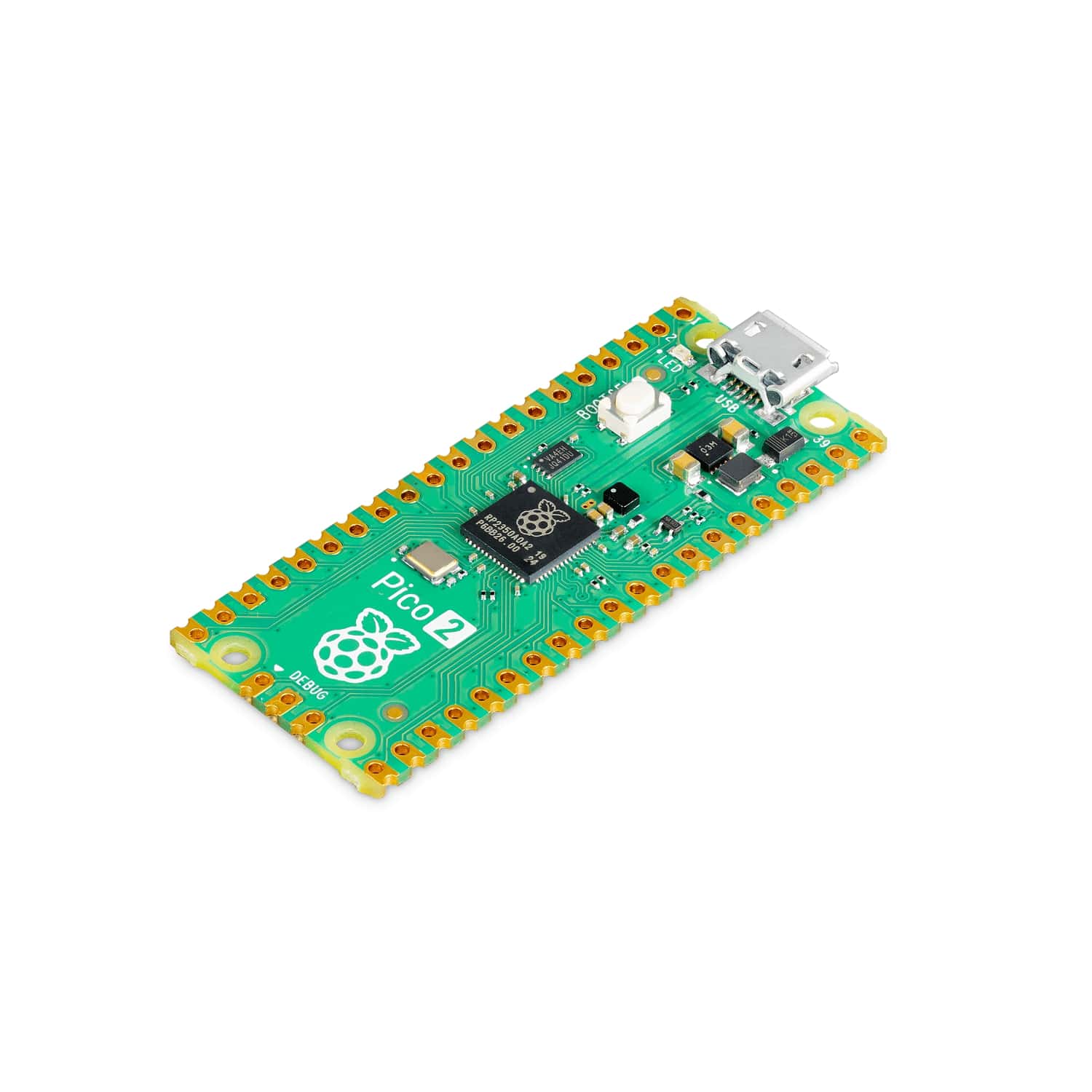
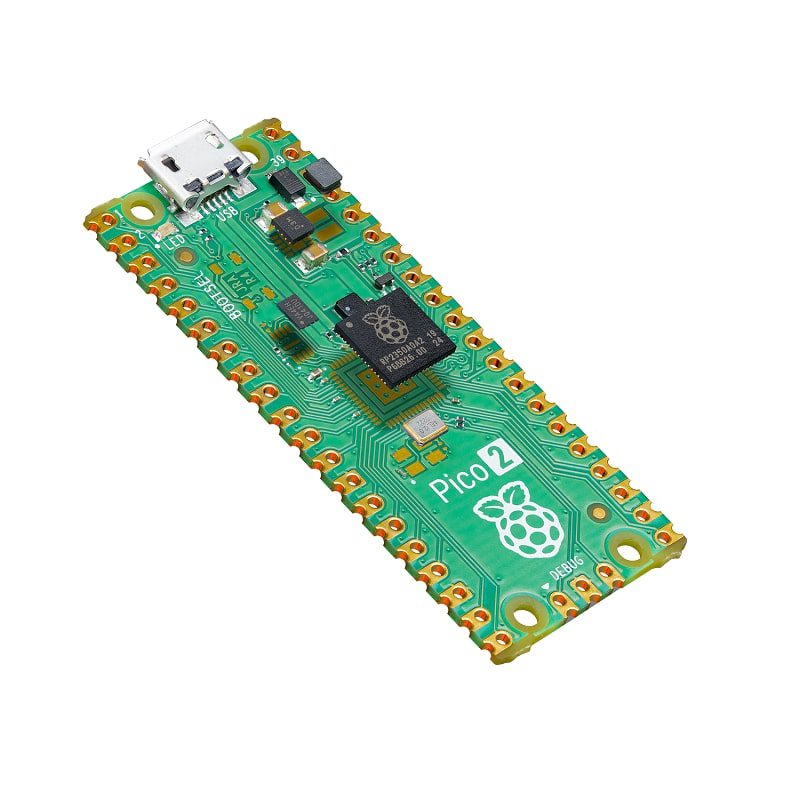
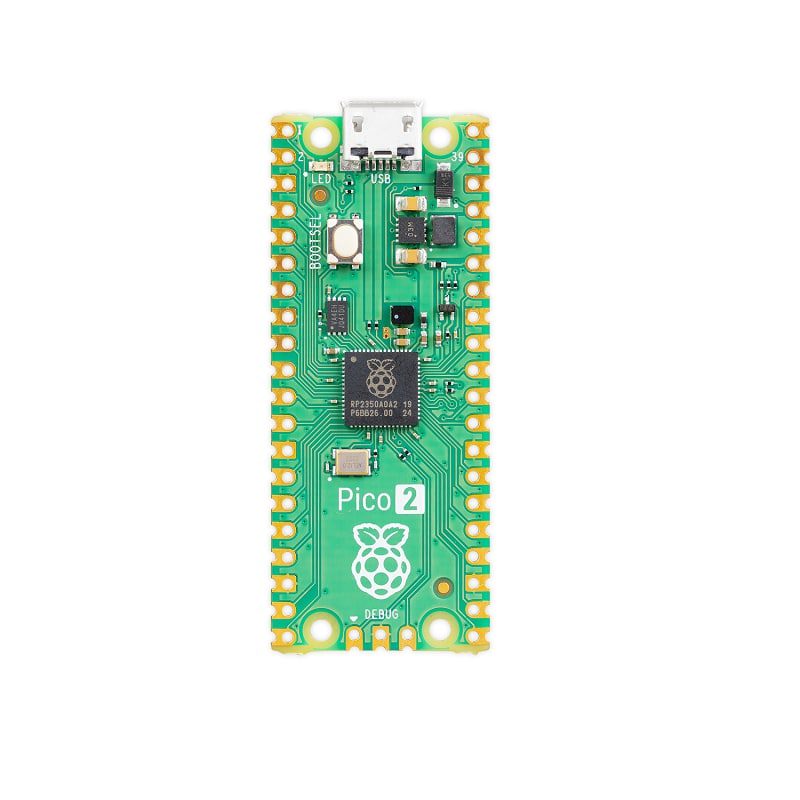
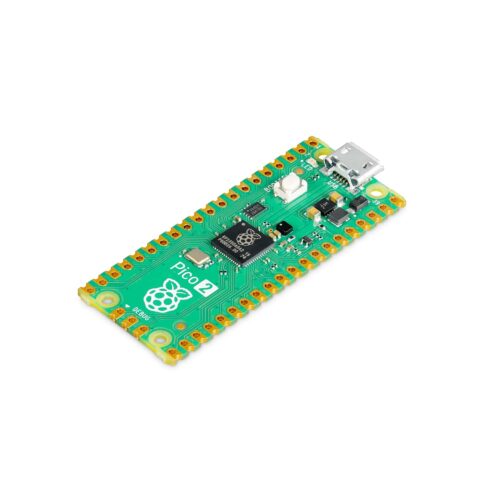
🔧 Raspberry Pi Pico 2 – Next-Gen High-Performance Microcontroller Board
The Raspberry Pi Pico 2 is the latest generation high-performance microcontroller board featuring the revolutionary RP2350A chip with dual-core ARM Cortex-M33 processors running at 150MHz (or dual RISC-V Hazard3 cores), 520KB RAM, and 4MB flash storage. As the successor to the original Pico, the Pico 2 delivers double the RAM, significantly enhanced security features including Arm TrustZone, hardware floating-point acceleration, and improved performance while maintaining full pin compatibility and the same compact 51×21mm form factor. With 26 GPIO pins (4 analog inputs), dual UART, dual SPI, dual I2C, 24 PWM channels, enhanced programmable I/O (PIO), and comprehensive support for MicroPython, C/C++, and Arduino IDE, this board is perfect for education, advanced robotics, embedded systems, automation, data logging, signal processing, AI/ML applications, and professional projects requiring high performance without wireless connectivity at an incredible $5 USD price point.
✨ Key Highlights
- 🚀 New RP2350A Chip – Next-gen dual-core @ 150MHz
- ⚡ ARM Cortex-M33 – Or switchable RISC-V Hazard3 cores
- 💾 520KB RAM – Double the original Pico (264KB → 520KB)
- 💾 4MB Flash – Double the original Pico (2MB → 4MB)
- 🔒 Arm TrustZone – Hardware security for secure applications
- 🔢 Hardware FPU – Single & double precision floating-point
- 🔌 26 GPIO Pins – Highly flexible multifunction I/O
- 📊 4 Analog Inputs – 12-bit ADC (one more than original)
- ⚡ 24 PWM Channels – 50% more than original Pico
- 💰 Only $5 USD – Best value high-performance microcontroller!
📊 Technical Specifications
| 💻 Microcontroller |
RP2350A (Raspberry Pi next-gen silicon) |
| 🔧 CPU Options |
Dual-core ARM Cortex-M33 @ 150MHz OR dual RISC-V Hazard3 |
| 💾 SRAM |
520KB on-chip SRAM (double original Pico’s 264KB) |
| 💾 Flash Memory |
4MB onboard QSPI flash (double original Pico’s 2MB) |
| 🔒 Security |
Arm TrustZone-M, secure boot, 8KB OTP memory |
| 🔢 FPU |
Hardware floating-point (single & double precision) |
| 🔌 GPIO Pins |
26× multifunction GPIO pins (pin-compatible with original) |
| 📊 ADC |
4× 12-bit ADC channels @ 500ksps (GPIO 26-29) |
| ⚡ PWM |
24× PWM channels (12 slices, 2 channels each) |
| 🔌 UART |
2× UART interfaces |
| 📡 SPI |
2× SPI interfaces |
| 📡 I2C |
2× I2C interfaces |
| 🎨 PIO |
12× Programmable I/O state machines (vs 8 on original) |
| 🔌 USB |
Micro USB (device mode, USB 1.1 full-speed) |
| ⚡ Operating Voltage |
1.8V – 5.5V (3.3V logic levels) |
| 🔋 Power Input |
5V via micro USB or VSYS pin (1.8-5.5V) |
| 🔋 Current Draw |
~25-40mA typical, ~0.8mA sleep mode |
| 🌡️ Operating Temp |
-20°C to +85°C |
| 📏 Dimensions |
51mm × 21mm × 1mm (same as original Pico) |
| ⚖️ Weight |
~3 grams (bare board) |
🆕 What’s New in Pico 2 vs Original Pico
| Double RAM |
520KB vs 264KB – significantly better multitasking |
| Double Flash |
4MB vs 2MB – more storage for code and data |
| Faster CPU |
150MHz vs 133MHz – 13% speed increase |
| ARM Cortex-M33 |
vs M0+ – more powerful, DSP instructions, better efficiency |
| RISC-V Option |
NEW – can boot as RISC-V instead of ARM |
| Hardware FPU |
NEW – single & double precision floating-point acceleration |
| Arm TrustZone |
NEW – hardware security isolation for secure code |
| 4 ADC Channels |
vs 3 ADC – one additional analog input |
| 24 PWM Channels |
vs 16 PWM – 50% more PWM capability |
| 12 PIO Machines |
vs 8 PIO – 50% more programmable I/O |
| Better Power Efficiency |
Improved power management, lower sleep current |
🎯 Perfect For
- 🎓 Education – STEM learning, universities, coding workshops
- 🤖 Advanced Robotics – Motor control, sensor fusion, autonomy
- 📊 Data Acquisition – High-speed sampling, signal processing
- 🔢 Scientific Computing – Math-intensive tasks with hardware FPU
- 🎮 Game Development – More RAM for complex game logic
- 🎨 LED Art – Large displays with 12 PIO state machines
- 💡 Automation – Industrial control, home automation, monitoring
- 🧠 AI/ML Edge – TinyML, neural networks, pattern recognition
🆚 Pico 2 vs Pico vs Pico 2 W
| Feature |
Pico 2 |
Pico (Original) |
Pico 2 W |
| Chip |
✅ RP2350A |
RP2040 |
✅ RP2350B |
| CPU |
✅ M33 @ 150MHz |
M0+ @ 133MHz |
✅ M33 @ 150MHz |
| RISC-V Option |
✅ Yes |
❌ No |
✅ Yes |
| RAM |
✅ 520KB |
264KB |
✅ 520KB |
| Flash |
✅ 4MB |
2MB |
✅ 4MB |
| Hardware FPU |
✅ Yes (SP+DP) |
❌ No |
✅ Yes (SP+DP) |
| TrustZone |
✅ Yes |
❌ No |
✅ Yes |
| ADC Channels |
✅ 4× 12-bit |
3× 12-bit |
✅ 4× 12-bit |
| PWM Channels |
✅ 24 |
16 |
✅ 24 |
| PIO Machines |
✅ 12 |
8 |
✅ 12 |
| WiFi |
❌ No |
❌ No |
✅ 2.4GHz |
| Bluetooth |
❌ No |
❌ No |
✅ BLE 5.2 |
| Price |
✅ $5 |
✅ $4 |
$7 |
✅ Key Advantages of Pico 2
- 💾 Double RAM & Flash – 520KB RAM + 4MB flash for complex programs
- 🚀 Significantly Faster – M33 cores + FPU + 150MHz = major performance boost
- 🔒 Hardware Security – Arm TrustZone for secure applications
- 🔢 FPU Acceleration – 10-100× faster floating-point math
- 🎨 More Resources – 4 ADC, 24 PWM, 12 PIO vs original Pico
- 🔄 ARM or RISC-V – Choose architecture at boot time
- 💰 Best Value – Only $5 for premium features (vs $4 original)
- 🔌 Pin Compatible – Drop-in upgrade from original Pico
- 📚 Full Ecosystem – MicroPython, C/C++, Arduino support
- ⚡ Lower Power – More efficient than original Pico
⚠️ Important Considerations
- 📡 No Wireless – Use Pico 2 W for WiFi/Bluetooth projects
- 🔌 3.3V Logic – Not 5V tolerant (requires level shifters)
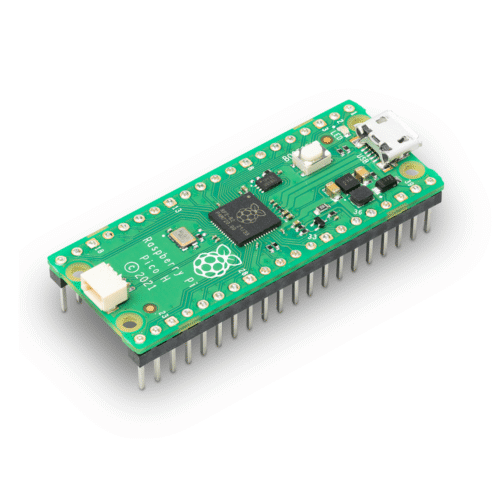
- 🔧 Headers Unpopulated – Requires soldering (or buy Pico 2 H variant)
- 🆕 Newer Software – Some libraries still being updated for RP2350
- 💰 $1 More – Than original Pico ($5 vs $4)
- 📏 New Product – May have limited initial availability
🔒 Security Features (Arm TrustZone-M)
| Arm TrustZone-M |
Hardware isolation between secure and non-secure code execution |
| Secure Boot |
Cryptographic verification of firmware before execution |
| 8KB OTP Memory |
One-time programmable for encryption keys, serial numbers |
| Memory Protection |
MPU prevents unauthorized memory access |
| Crypto Acceleration |
Hardware AES, SHA-256 for fast encryption |
| Secure Storage |
Protected flash regions for sensitive data |
| Use Cases |
Payment systems, medical devices, industrial control, DRM |
🔢 Hardware Floating-Point Unit (FPU)
| Single Precision |
32-bit float operations (standard C float type) |
| Double Precision |
64-bit float operations (C double) – rare in microcontrollers! |
| Performance Gain |
~10-100× faster than software floating-point emulation |
| Applications |
Scientific computing, DSP, physics simulations, AI/ML |
| Math Functions |
Fast trigonometry (sin/cos), square root, division |
| Energy Efficiency |
Less CPU time = lower power consumption overall |
🔄 ARM vs RISC-V Architecture Choice
| ARM Cortex-M33 |
Industry standard, mature toolchain, maximum library compatibility |
| RISC-V Hazard3 |
Open-source ISA, royalty-free, growing ecosystem |
| How to Switch |
Select architecture via firmware (.uf2 file) during BOOTSEL |
| Performance |
Both run at 150MHz, similar performance characteristics |
| Compatibility |
ARM has more existing libraries, RISC-V rapidly growing |
| Recommended |
ARM for production/beginners, RISC-V for learning/experimentation |
🐍 MicroPython Quick Start
| Getting Started with Pico 2 (3 Easy Steps) |
# Step 1: Download MicroPython
# Visit: micropython.org/download/rp2-pico-2/
# Download latest .uf2 file (ARM or RISC-V)
# Step 2: Install Firmware
# – Hold BOOTSEL button on Pico 2
# – Connect USB cable (keep holding)
# – Release when RPI-RP2 drive appears
# – Drag .uf2 file to RPI-RP2 drive
# – Board reboots with MicroPython!
# Step 3: Test with Thonny IDE
# Download Thonny: thonny.org
# Select: MicroPython (Raspberry Pi Pico)
# Test LED blink:
from machine import Pin
import time
led = Pin(25, Pin.OUT)
while True:
led.toggle()
time.sleep(1)
# Test improved performance:
import machine
print(‘CPU:’, machine.freq() // 1_000_000, ‘MHz’)
print(‘RAM:’, machine.mem_info()) # 520KB!
# Test hardware FPU:
import math
x = 3.14159265359
result = math.sin(x) * math.sqrt(x) # Fast!
print(‘FPU result:’, result)
|
🎓 Example Projects
- 🤖 Advanced Robot – Sensor fusion, path planning with extra RAM
- 📊 Data Logger – 4 ADC channels + fast sampling + large buffer
- 🎮 Retro Game Console – More RAM for sprite data and game logic
- 🌈 Massive LED Matrix – 12 PIO machines drive huge displays
- 🔢 Scientific Calculator – Hardware FPU for complex math
- 🎵 Audio Synthesizer – DSP with FPU for waveform generation
- 🧠 TinyML Projects – Neural network inference with FPU
- 📡 Protocol Analyzer – Complex signal decoding with PIO
💡 Pro Tips for Pico 2
- 💾 Use Extra RAM – 520KB enables large buffers, complex data structures
- 🔢 Leverage FPU – Use float/double for math-heavy code (huge speedup)
- 🎨 12 PIO Machines – Drive multiple LED strips, displays simultaneously
- 📊 4 ADC Channels – One more analog input than original Pico
- ⚡ Overclock Safely – Can run >150MHz for demanding applications
- 🔒 TrustZone for Security – Isolate sensitive code in production
- 🔄 Try RISC-V – Experiment with open-source architecture
- 💾 4MB Flash – Store large datasets, filesystem, multiple programs
📊 Performance Comparison
🔍 Troubleshooting Guide
| Not Recognized |
Use data-capable USB cable (not charge-only) |
| BOOTSEL Not Working |
Hold button BEFORE connecting USB, keep holding |
| Library Error |
Check for RP2350-compatible version (some updating) |
| Code Runs Slowly |
Enable compiler optimizations (-O2 or -O3 in C/C++) |
| FPU Not Working |
Use float/double types, check compiler flags |
| Out of Memory |
Unlikely with 520KB! Check for memory leaks |
| GPIO Not Working |
Verify pin number (0-29), check 3.3V logic levels |
📦 Package Contents
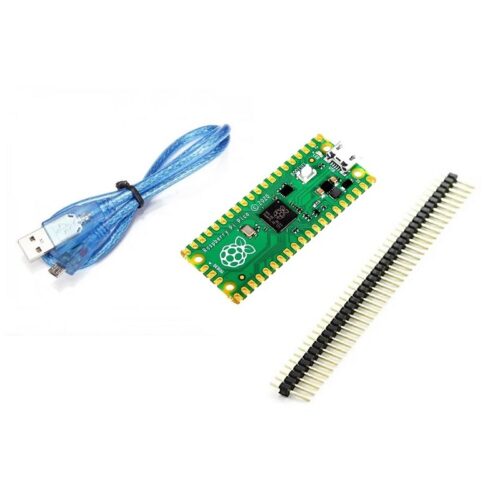
- ✅ 1× Raspberry Pi Pico 2 board (RP2350A chip)
- ⚠️ Note: Board only – no cables or headers
- ⚠️ Note: GPIO headers unpopulated (requires soldering)
- ⚠️ Note: Micro USB cable sold separately
- ⚠️ Alternative: Pico 2 H available with pre-soldered headers ($6)
- ✅ Tip: Consider starter kit with breadboard, cables, components
🔋 Power Consumption
| Deep Sleep |
~0.8mA @ 3.3V (better than original Pico) |
| Idle |
~20-30mA @ 5V (no computation) |
| Active (Light) |
~25-40mA @ 5V (typical program execution) |
| Active (Heavy) |
~50-80mA @ 5V (both cores + FPU) |
| Peak |
~100mA @ 5V (maximum load) |
| Recommended PSU |
5V 1A USB adapter or computer USB port |
💰 Pricing & Value
| Raspberry Pi Pico 2 |
$5 USD (official MSRP) |
| Raspberry Pi Pico 2 H |
$6 USD (with pre-soldered headers) |
| Raspberry Pi Pico (original) |
$4 USD (previous generation) |
| Raspberry Pi Pico 2 W |
$7 USD (with WiFi/Bluetooth) |
| Value Proposition |
✅ $1 more than original = 2× RAM, 2× flash, FPU, TrustZone! |
🔧 Compatible Accessories
- 🔌 Pin Compatible – All original Pico accessories work perfectly
- 📺 Displays – OLED (SSD1306), TFT (ST7789), character LCDs
- 🌡️ Sensors – DHT22, BME280, MPU6050, ultrasonic, PIR
- 💡 LED Strips – WS2812B NeoPixels, APA102, addressable LEDs
- 🎩 HATs/Add-ons – Pico Explorer, Display Pack, Audio Pack
- ⚙️ Motors – Servo drivers, stepper drivers, DC motor controllers
- 🔋 Power – LiPo batteries, UPS modules, solar chargers
- 📡 Communication – LoRa, nRF24L01+, RS485 modules
💻 Programming Environment Support
| MicroPython |
✅ Official support, easiest for beginners |
| C/C++ (Pico SDK) |
✅ Official SDK with RP2350 support |
| Arduino IDE |
✅ Community core (Earle Philhower) |
| CircuitPython |
✅ Adafruit adding RP2350 support |
| Rust |
✅ Embassy and embedded-hal support |
| TinyGo |
✅ Go language for embedded systems |
| Development Tools |
Thonny, VS Code, CMake, OpenOCD |
🧠 AI/ML Capabilities
| TensorFlow Lite Micro |
Run neural networks on-device |
| Hardware FPU |
Accelerates matrix multiplication for ML |
| 520KB RAM |
Larger models and datasets than original Pico |
| DSP Instructions |
M33 includes DSP extensions for signal processing |
| Applications |
Voice recognition, gesture detection, anomaly detection |
| Performance |
~2-10× faster ML inference than original Pico |
📚 Learning Resources
- 📖 Official Datasheet – datasheets.raspberrypi.com/rp2350/
- 📘 Get Started Guide – Free PDF from Raspberry Pi Foundation
- 💻 Pico SDK – github.com/raspberrypi/pico-sdk
- 🐍 MicroPython Docs – docs.micropython.org
- 🎓 Example Projects – GitHub, Hackster.io, Instructables
- 🌐 Forums – forums.raspberrypi.com
- 📹 Video Tutorials – YouTube (thousands of Pico tutorials)
- 📚 Books – “Get Started with MicroPython on Raspberry Pi Pico”
🎨 Enhanced PIO Features
| PIO Blocks |
3 independent blocks (vs 2 on original Pico) |
| State Machines |
12 total (4 per block, vs 8 on original) |
| Clock Speed |
Up to system clock (150MHz default) |
| Applications |
WS2812B LEDs, VGA, DVI, HDMI, custom protocols |
| Advantage |
More simultaneous timing-critical tasks |
| Examples |
Drive 12 LED strips, 6 displays, or complex I/O simultaneously |
🛡️ Product Information
✅ Raspberry Pi Pico 2 – Next-Gen High-Performance Microcontroller Board
✅ Manufacturer: Raspberry Pi Ltd (official product, latest generation)
✅ Microcontroller: RP2350A (next-gen Raspberry Pi silicon, no wireless)
✅ CPU: Dual-core ARM Cortex-M33 @ 150MHz OR dual RISC-V Hazard3 (switchable!)
✅ RAM: 520KB on-chip SRAM (double original Pico’s 264KB)
✅ Flash: 4MB onboard QSPI flash (double original Pico’s 2MB)
✅ Security: Arm TrustZone-M, secure boot, 8KB OTP, crypto acceleration
✅ FPU: Hardware floating-point (single & double precision) – 10-100× faster math
✅ GPIO: 26× multifunction pins (pin-compatible with original Pico)
✅ ADC: 4× 12-bit 500ksps (GPIO 26-29, one more than original)
✅ PWM: 24 channels (12 slices, 50% more than original 16 channels)
✅ Interfaces: 2× UART, 2× SPI, 2× I2C (configurable GPIO)
✅ PIO: 12× Programmable I/O state machines (50% more than original 8)
✅ USB: Micro USB (device mode, USB 1.1 full-speed)
✅ Power: 5V via USB or 1.8-5.5V via VSYS pin
✅ Dimensions: 51mm × 21mm × 1mm (same footprint as original Pico)
⚠️ Important: Official MSRP $5 USD (Pico 2), $6 USD (Pico 2 H with headers). Major upgrade from original Pico: 2× RAM (520KB), 2× flash (4MB), faster CPU (150MHz), hardware FPU, Arm TrustZone security. ARM or RISC-V: Choose architecture via firmware (.uf2 file selection). Pin-compatible: Drop-in replacement for original Pico in most projects. NO wireless: For WiFi/Bluetooth use Pico 2 W ($7). Headers unpopulated: Requires soldering or buy Pico 2 H variant. FPU advantage: 10-100× faster floating-point vs software emulation. Security: TrustZone-M for isolated secure execution, hardware crypto. Performance: ~2-5× faster than original Pico for math-intensive tasks. Programming: MicroPython (easiest), C/C++ SDK (fastest), Arduino IDE (familiar). Bootloader: Hold BOOTSEL + USB, drag .uf2 firmware file. AI/ML: Hardware FPU + 520KB RAM enables TensorFlow Lite Micro. Perfect for: Education, robotics, data acquisition, scientific computing, automation, AI/ML edge computing. Not suitable for: Wireless projects (use Pico 2 W), 5V logic (needs level shifters), extreme budget projects (original Pico $1 cheaper). Best value high-performance microcontroller available!