Description
📸 ESP32-CAM Module – WiFi Camera with AI Vision Capabilities
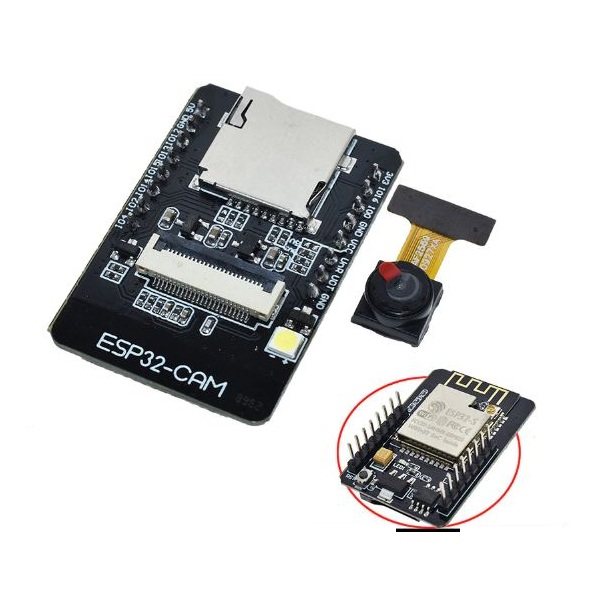
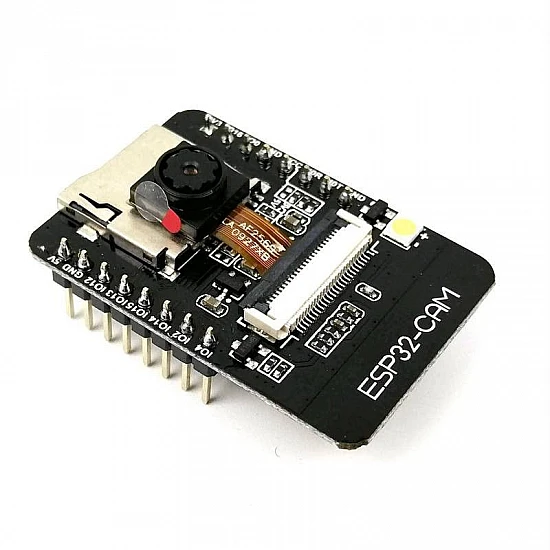
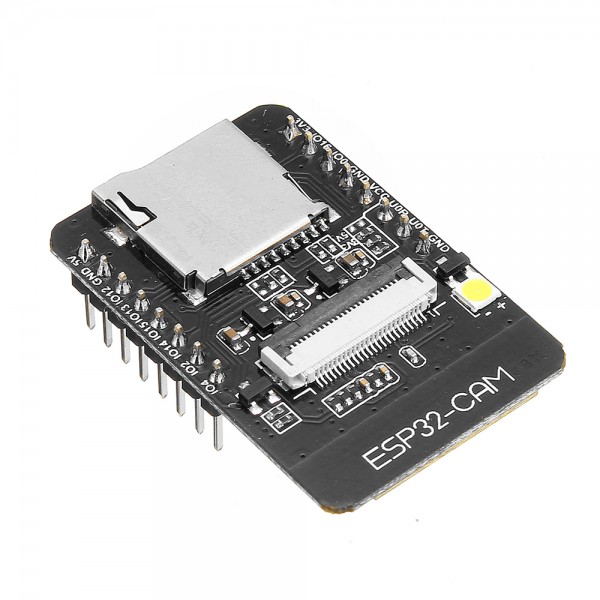
The ESP32-CAM is a compact, feature-rich camera module built around the ESP32-S chip with integrated WiFi and Bluetooth connectivity. Featuring an OV2640 2MP camera, microSD card slot, and multiple GPIO pins, this module is perfect for IoT camera projects, video streaming, facial recognition, image processing, and AI-powered vision applications. With onboard camera, WiFi, and powerful processing, the ESP32-CAM delivers professional surveillance and computer vision capabilities at an incredibly affordable price.
✨ Key Highlights
- 📸 2MP Camera Included – OV2640 with up to 1600×1200 resolution
- 🔌 WiFi + Bluetooth – 802.11 b/g/n WiFi and Bluetooth 4.2 (BLE)
- 💾 MicroSD Card Slot – Support for up to 4GB storage (FAT32)
- 🤖 AI Vision Ready – Face detection, recognition, object tracking
- 📡 Video Streaming – Real-time MJPEG/JPEG streaming over WiFi
- 💡 Built-in LED Flash – White LED for low-light photography
- ⚡ ESP32-S Core – Dual-core processor with 520KB SRAM
- 🔧 GPIO Expansion – 9 usable GPIO pins for sensors/peripherals
- 🔋 Low Power Modes – Deep sleep support for battery applications
📊 Technical Specifications
| Specification |
Details |
| 🖥️ SoC |
ESP32-S (Based on ESP32) |
| ⚙️ CPU |
Dual-core Xtensa 32-bit LX6 @ 160MHz |
| 💾 SRAM |
520KB |
| 💿 Flash (PSRAM) |
4MB Flash + 4MB PSRAM |
| 📸 Camera Sensor |
OV2640 (2 Megapixel) |
| 📐 Max Resolution |
1600 x 1200 (UXGA) |
| 🎥 Video Formats |
JPEG, BMP, GRAYSCALE |
| 📶 WiFi |
802.11 b/g/n (2.4GHz) |
| 📡 Bluetooth |
Bluetooth 4.2 BR/EDR + BLE |
| 💳 MicroSD Card |
Supports up to 4GB (FAT32) |
| 🔢 GPIO Pins |
9 usable GPIO (some shared) |
| 📈 ADC |
Limited (most used by camera) |
| ⚡ Operating Voltage |
5V (via USB/external regulator) |
| 💡 Current Consumption |
180mA (Active WiFi), 120mA (Idle), <5mA (Deep Sleep) |
| 💡 LED Flash |
Built-in white LED (GPIO4) |
| 🔄 USB to Serial |
None (Requires external FTDI/USB adapter) |
| 📏 Dimensions |
40mm x 27mm x 4.5mm |
| ⚖️ Weight |
~10g |
📸 Camera Specifications (OV2640)
| Feature |
Details |
| 📐 Sensor Type |
1/4″ CMOS (OmniVision OV2640) |
| 🔢 Resolution |
2 Megapixel (1600 x 1200) |
| 📊 Supported Formats |
UXGA, SVGA, CIF, VGA, QVGA and more |
| 🎨 Output Format |
JPEG (Compressed), RGB565, YUV422 |
| 🎥 Video FPS |
Up to 60fps @ QQVGA, 30fps @ VGA |
| 🔦 Low Light Performance |
Good with built-in LED flash |
| 🎯 Focus |
Fixed focus (adjustable manually) |
| 👁️ Field of View |
~66° (depends on lens variant) |
| 📷 Image Quality |
Good for surveillance, decent for photography |
| ⚙️ Special Features |
Auto exposure, auto white balance, image effects |
🔌 Pin Configuration
| Pin Name |
GPIO |
Functions / Notes |
| U0R |
GPIO3 |
UART RX (Programming) |
| U0T |
GPIO1 |
UART TX (Programming) |
| IO0 |
GPIO0 |
Boot mode (Pull LOW for flash mode) |
| IO2 |
GPIO2 |
Onboard LED, Boot mode pin |
| IO4 |
GPIO4 |
Flash LED (Can be used as GPIO) |
| IO12 |
GPIO12 |
General purpose GPIO, SD_D2 |
| IO13 |
GPIO13 |
General purpose GPIO, SD_D3 |
| IO14 |
GPIO14 |
General purpose GPIO, SD_CLK |
| IO15 |
GPIO15 |
General purpose GPIO, SD_CMD |
| IO16 |
GPIO16 |
UART2 RX, PSRAM CS |
| 5V |
Power |
5V input power |
| GND |
Ground |
Ground connection |
⚠️ Important GPIO Notes
| GPIO |
Warning / Restriction |
| GPIO0 |
⚠️ Must be HIGH during boot. Pull LOW only for programming |
| GPIO1/GPIO3 |
⚠️ Used for UART – avoid using during programming |
| GPIO4 |
💡 Controls flash LED – high current draw when ON |
| GPIO12-15 |
⚠️ Shared with SD card – cannot use both simultaneously |
| GPIO16 |
⚠️ Used for PSRAM – limited availability |
🎯 Perfect For
| Application |
Description |
| 🏠 Home Security |
WiFi surveillance cameras, doorbell cameras |
| 👤 Face Recognition |
Access control, attendance systems, smart locks |
| 📹 Video Streaming |
Live MJPEG streaming to web browser or app |
| 🤖 AI Vision Projects |
Object detection, motion tracking, pattern recognition |
| 📸 Timelapse Photography |
Plant growth monitoring, construction progress |
| 🚗 Dashcam / Vehicle Monitoring |
Car cameras with WiFi download capability |
| 📦 Package Detection |
Smart mailbox, delivery notifications |
| 🐾 Pet Monitoring |
Watch pets remotely, motion-triggered recording |
| 🔬 Microscope Imaging |
Digital microscope with WiFi image transfer |
| 🎥 Action Cameras |
DIY action camera projects, sports recording |
| 🌐 WebCam Server |
IP camera accessible via web interface |
| 📊 QR/Barcode Scanner |
Inventory management, smart shopping |
📦 Package Contents
- ✅ 1x ESP32-CAM Module (with OV2640 Camera)
- ✅ 1x Camera cable (pre-connected)
- ✅ Pin headers (not soldered – optional)
- ✅ Anti-static packaging
- ⚠️ Note: USB adapter NOT included – requires separate FTDI/USB-to-Serial adapter for programming
💻 Programming Methods
| Method |
Requirements |
Difficulty |
| 🔌 FTDI USB Adapter |
FTDI FT232RL or CP2102 module |
⭐⭐ Medium (Most common) |
| 📱 ESP32-CAM-MB |
USB programmer board (MB module) |
⭐ Easy (Plug and play) |
| 🔧 Arduino as Programmer |
Arduino Uno/Mega board |
⭐⭐⭐ Advanced |
| 📡 OTA Updates |
Already programmed with OTA code |
⭐ Easy (After initial setup) |
🔧 FTDI Programming Connections
| ESP32-CAM Pin |
FTDI Pin |
Notes |
| 5V |
VCC (5V) |
Power supply |
| GND |
GND |
Ground connection |
| U0R (GPIO3) |
TX |
UART receive |
| U0T (GPIO1) |
RX |
UART transmit |
| IO0 |
GND |
⚠️ Connect to GND for programming mode, then disconnect |
💻 Software Support
| Platform |
Support Level |
| 🔷 Arduino IDE |
✅ Full Support (Recommended) |
| ⚙️ ESP-IDF |
✅ Official Espressif SDK |
| 🌐 PlatformIO |
✅ Full Support |
| 🐍 MicroPython |
⚠️ Limited (Camera support varies) |
| 📹 CameraWebServer |
✅ Built-in example (Face detection included) |
| 🤖 TensorFlow Lite |
✅ Supported for AI vision |
🎥 Supported Resolutions
| Resolution Name |
Dimensions |
Best For |
| UXGA |
1600 x 1200 |
📸 High-quality photos |
| SXGA |
1280 x 1024 |
📷 Good quality images |
| XGA |
1024 x 768 |
🖼️ Standard quality |
| SVGA |
800 x 600 |
📹 Video streaming |
| VGA |
640 x 480 |
🎥 Smooth streaming |
| CIF |
400 x 296 |
📡 Low bandwidth |
| QVGA |
320 x 240 |
⚡ Fast processing |
| QQVGA |
160 x 120 |
🤖 AI vision tasks |
⚠️ Important Notes & Limitations
- 🔌 No USB-to-Serial chip onboard – Requires external FTDI/CP2102 adapter for programming
- ⚡ 5V power required – 3.3V not sufficient for camera operation
- ⚠️ GPIO0 must be connected to GND during programming, then disconnected for normal operation
- 📌 Limited GPIO availability – Most pins used by camera and PSRAM
- 💳 SD card and some GPIOs share pins – Cannot use both simultaneously
- 📸 Image quality – Good for surveillance, not professional photography
- 🎥 Frame rate decreases with higher resolutions (UXGA = ~5-10fps)
- 💡 LED flash is bright – GPIO4 drives high current (can blind in close range)
- 🔋 Power consumption is high when camera and WiFi active (~180mA)
- 🌐 WiFi range limited when transmitting video (high bandwidth usage)
- ⚙️ PSRAM required for higher resolutions and frame buffers
- 🔧 Soldering may be required for pin headers if not pre-installed
🛠️ Getting Started
- 🔧 Solder Pin Headers (if not pre-soldered) – Required for FTDI connection
- 🔌 Connect FTDI Adapter – Wire according to connection table above
- ⚠️ Connect GPIO0 to GND – Required for programming mode
- 📥 Install Arduino IDE – Download latest version
- ⚙️ Add ESP32 Board Support – Use board manager URL from Espressif
- 🎯 Select Board – Choose “AI Thinker ESP32-CAM”
- ⚡ Select Port & Upload Speed – 115200 baud recommended for first upload
- 📹 Upload CameraWebServer Example – File → Examples → ESP32 → Camera
- 🔓 Disconnect GPIO0 from GND – Remove jumper/wire after upload
- 🔄 Press Reset Button – Restart ESP32-CAM
- 📡 Connect to WiFi – Check Serial Monitor for IP address
- 🌐 Open Web Interface – Enter IP in browser to see camera stream
- 🚀 Enable Face Detection! – Use buttons on web interface
✅ Why Choose ESP32-CAM?
| Feature |
Advantage |
| 💰 Ultra Affordable |
Cheapest WiFi camera solution on market |
| 🤖 AI Ready |
Built-in face detection and recognition |
| 📡 WiFi + BT Combo |
Wireless connectivity for IoT integration |
| 💾 SD Card Storage |
Local recording without cloud dependency |
| 🔧 Fully Programmable |
Complete control over functionality |
| 🌍 Huge Community |
Extensive tutorials, projects, and support |
| 📐 Compact Size |
Small footprint for embedded projects |
| ⚡ Low Power Options |
Deep sleep for battery-powered cameras |
🔍 Common Issues & Solutions
| Issue |
Solution |
| Upload Failed |
✅ Ensure GPIO0 connected to GND during upload |
| Camera Init Failed |
✅ Check 5V power supply, ensure sufficient current (500mA+) |
| Brown-out Detector |
✅ Use quality 5V power source, add capacitor (100-470µF) |
| WiFi Won’t Connect |
✅ Disconnect GPIO0 from GND after programming |
| Poor Image Quality |
✅ Adjust focus by rotating lens, ensure good lighting |
| Low Frame Rate |
✅ Lower resolution, reduce JPEG quality setting |
🛡️ Warranty & Support
✅ Genuine ESP32-S chip with PSRAM
✅ Authentic OV2640 camera sensor
✅ Pre-tested camera and WiFi functionality
✅ Comprehensive programming guide included
✅ Example code and libraries provided
✅ Technical support for setup issues
✅ Fast replacement for defective units
⚠️ Note: FTDI adapter sold separately