🔧 3.5 Inch TFT Display (For Arduino) – Large Full-Color Touchscreen Display Module
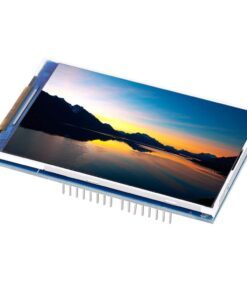
The 3.5 Inch TFT Display for Arduino is a large, high-resolution full-color touchscreen display module featuring 320×480 pixel resolution with 65K vibrant colors and integrated resistive touch panel. Based on the ILI9486 or ILI9488 driver chip, this display offers professional-grade graphical capabilities with 55% more screen area than 2.4″ displays. Available in both shield format (direct plug-in) and breakout board versions, featuring microSD card slot for image/data storage, parallel or SPI interface options, and comprehensive library support, this display is perfect for advanced GUI applications, data dashboards, industrial HMI, automotive displays, medical devices, gaming, and Arduino projects requiring maximum screen real estate with interactive full-color graphics. Compatible with Arduino Uno R3, Mega 2560, ESP32, and most microcontrollers.
✨ Key Highlights
- 📺 Large 3.5″ Display – 320×480 pixel resolution (153,600 pixels)
- 🎨 65K Colors – 16-bit color depth, vibrant full-color display
- 👆 Resistive Touchscreen – 4-wire touch panel with stylus/finger support
- 📏 55% Larger Screen – Bigger viewing area than 2.4″ displays
- 🔌 Multiple Formats – Shield (plug-in) or breakout board versions
- 💾 MicroSD Card Slot – Store images, data, fonts on SD card
- ⚡ Dual Interface – 8-bit parallel (fast) or SPI (fewer pins)
- 💻 ILI9486/9488 Driver – Industry standard, excellent library support
- 📊 Double Resolution – 320×480 = 2× pixels of smaller displays
- 💰 Great Value – $12-20, best large color display option
📊 Technical Specifications
| 📺 Display Type |
TFT LCD (Thin-Film Transistor Liquid Crystal) |
| 📏 Screen Size |
3.5 inch diagonal (~89mm) |
| 📊 Resolution |
320×480 pixels (HVGA, 153,600 total) |
| 📐 Active Area |
~73.44×48.96mm display area |
| 🎨 Color Depth |
65K colors (16-bit RGB, RGB565 format) |
| 💻 Driver IC |
ILI9486 or ILI9488 (varies by model) |
| 👆 Touch Type |
4-wire resistive touchscreen |
| 📡 Interface |
8-bit parallel or SPI (selectable on some models) |
| ⚡ Operating Voltage |
3.3V – 5V DC (onboard regulator) |
| 🔋 Current Draw |
~120-200mA @ 5V (backlight on, typical) |
| 💡 Backlight |
White LED, 6 LEDs, PWM dimmable |
| 💾 Storage |
MicroSD card slot (SPI interface) |
| 🌡️ Operating Temp |
-20°C to +70°C |
| 📏 Module Size |
~86×56×7mm (varies by manufacturer) |
| ⚖️ Weight |
~40-55 grams |
🔌 Pin Configuration (Breakout Board – Parallel Mode)
| Pin |
Function |
Description |
| VCC |
Power Supply |
5V DC (or 3.3V on some models) |
| GND |
Ground |
Power ground (0V) |
| CS |
Chip Select |
LCD chip select (active low) |
| RS/DC |
Register Select |
Command/Data select |
| WR |
Write Strobe |
Write control signal |
| RD |
Read Strobe |
Read control signal (optional) |
| RST/RESET |
Reset |
Hardware reset (active low) |
| D0-D7 |
Data Bus |
8-bit parallel data lines |
| LED/BL |
Backlight |
Backlight control (PWM capable) |
| T_CLK |
Touch Clock |
Touch SPI clock |
| T_CS |
Touch CS |
Touch chip select |
| T_DIN |
Touch Data In |
Touch SPI MOSI |
| T_DO |
Touch Data Out |
Touch SPI MISO |
| T_IRQ |
Touch Interrupt |
Touch interrupt (optional) |
| SD_CS |
SD Card CS |
SD card chip select |
| SD_MOSI |
SD Data In |
SD card SPI MOSI |
| SD_MISO |
SD Data Out |
SD card SPI MISO |
| SD_SCK |
SD Clock |
SD card SPI clock |
🎯 Perfect For
- 🏭 Industrial HMI – Human-machine interfaces, control panels
- 🚗 Automotive Displays – Dashboard displays, OBD readers, navigation
- 📊 Data Dashboards – Multi-parameter monitoring, real-time graphs
- 🎮 Gaming Projects – Retro game consoles, arcade machines
- ⚕️ Medical Devices – Patient monitors, diagnostic equipment
- 📈 Test Equipment – Oscilloscopes, signal generators, meters
- 🏠 Smart Home – Wall-mounted control panels, room controllers
- 💻 Desktop Displays – System monitors, info displays, status boards
🆚 Display Size Comparison
| Feature |
2.4″ TFT |
2.8″ TFT |
3.5″ TFT |
| Screen Size |
2.4″ diagonal |
2.8″ diagonal |
✅ 3.5″ diagonal |
| Resolution |
240×320 pixels |
240×320 pixels |
✅ 320×480 pixels |
| Total Pixels |
76,800 pixels |
76,800 pixels |
✅ 153,600 (2× more) |
| Active Area |
~49×37mm |
~57×43mm |
✅ ~73×49mm |
| Pixel Density |
~143 PPI |
~143 PPI |
~167 PPI |
| Viewing Distance |
0.3-1 meter |
0.5-1.5 meters |
✅ 1-3 meters |
| Power Draw |
~100-150mA |
~110-170mA |
~120-200mA |
| Price |
$10-15 |
$12-18 |
$15-25 |
✅ Key Advantages
- 📏 Maximum Screen Size – Largest affordable TFT display for Arduino
- 📊 High Resolution – 320×480 pixels, double the 2.4″ displays
- 🎨 Full Color Display – 65K colors for vibrant graphics and images
- 👁️ Excellent Readability – Large screen easy to read from distance
- 👆 Touch Interface – Resistive touchscreen for user interaction
- 💾 SD Card Storage – Store and display images, save data logs
- ⚡ Fast Parallel Mode – 8-bit parallel for smooth animations
- 🔌 Flexible Formats – Shield or breakout board options available
- 📚 Good Library Support – MCUFRIEND, Adafruit, TFT_eSPI libraries
- 🏭 Professional Grade – Suitable for commercial/industrial use
⚠️ Important Limitations
- 📌 Many Pins Required – Parallel mode uses 15+ pins
- 💾 Memory Intensive – 320×480 requires significant RAM for buffers
- ⚡ High Power Draw – 120-200mA, not ideal for battery projects
- 🐌 Slow on Uno – Arduino Uno struggles with full-screen updates
- 👆 Resistive Touch – Requires pressure, less responsive than capacitive
- 💰 Higher Cost – More expensive than smaller displays
- 📏 Larger Footprint – Requires more mounting space
- 🔧 Complex Wiring – Breakout version needs many connections
🔧 Arduino Connection (Parallel Mode – 8-bit)
| Display Pin |
Arduino Uno |
Arduino Mega |
Notes |
| VCC |
5V |
5V |
Power supply |
| GND |
GND |
GND |
Ground |
| CS |
10 |
10 (or any) |
Chip select |
| RS/DC |
9 |
9 (or any) |
Data/Command |
| WR |
8 |
8 (or any) |
Write strobe |
| RD |
3.3V (tie high) |
3.3V |
Read (not used) |
| RST |
Arduino RESET |
RESET |
Or separate pin |
| D0-D7 |
2, 3, 4, 5, 6, 7, A0, A1 |
22-29 |
Data bus |
| LED |
3.3V or 5V |
3.3V/5V |
Backlight (PWM pin for dimming) |
💻 Arduino Code Example (MCUFRIEND Library)
| 3.5″ TFT Display Basic Setup |
#include <Adafruit_GFX.h>
#include <MCUFRIEND_kbv.h>
MCUFRIEND_kbv tft;
// Color definitions (RGB565)
#define BLACK 0x0000
#define BLUE 0x001F
#define RED 0xF800
#define GREEN 0x07E0
#define CYAN 0x07FF
#define MAGENTA 0xF81F
#define YELLOW 0xFFE0
#define WHITE 0xFFFF
void setup() {
Serial.begin(9600);
// Auto-detect and initialize
uint16_t ID = tft.readID();
Serial.print(“TFT ID: 0x”);
Serial.println(ID, HEX);
tft.begin(ID);
tft.setRotation(0); // Portrait: 320×480
tft.fillScreen(BLACK);
// Display title
tft.setTextColor(CYAN);
tft.setTextSize(4);
tft.setCursor(50, 100);
tft.println(“3.5\” TFT”);
// Display specs
tft.setTextSize(2);
tft.setTextColor(YELLOW);
tft.setCursor(60, 200);
tft.println(“320 x 480”);
tft.setCursor(60, 230);
tft.println(“65K Colors”);
// Draw some graphics
tft.drawRect(20, 300, 280, 150, GREEN);
tft.fillCircle(160, 375, 50, RED);
}
void loop() {
// Your application code
}
|
👆 Touch Example (XPT2046 Touch Controller)
| Reading Touchscreen Input |
|
#include <XPT2046_Touchscreen.h>
// Touch CS pin
#define TOUCH_CS 4
XPT2046_Touchscreen touch(TOUCH_CS);
void setup() {
touch.begin();
touch.setRotation(0); // Match display rotation
}
void loop() {
if (touch.touched()) {
TS_Point p = touch.getPoint();
// Map to screen coordinates
int x = map(p.x, 0, 4095, 0, 320);
int y = map(p.y, 0, 4095, 0, 480);
// Draw at touch point
tft.fillCircle(x, y, 5, WHITE);
Serial.print(“X: “);
Serial.print(x);
Serial.print(” Y: “);
Serial.println(y);
}
delay(50);
}
|
🎨 Graphics Capabilities
| Text Display |
Built-in fonts (sizes 1-5), custom fonts, smooth fonts |
| Geometric Shapes |
Lines, rectangles, circles, triangles, rounded corners, arcs |
| Images |
BMP from SD card, RGB565 bitmaps in code, JPEG (with library) |
| Colors |
65,536 colors (RGB565: 5-6-5 bit color depth) |
| Fill Functions |
Solid fills, pattern fills, gradient fills (custom) |
| Pixel Control |
Individual pixel drawing (drawPixel, readPixel) |
| Screen Rotation |
0°, 90°, 180°, 270° rotation support |
| Animations |
Sprite movement, transitions, basic animations |
| Anti-aliasing |
Smooth fonts available with TFT_eSPI library |
📊 Display Resolution Modes
| Portrait (0°) |
320×480 pixels (tall orientation) |
| Landscape (90°) |
480×320 pixels (wide orientation) |
| Portrait Inverted (180°) |
320×480 pixels (upside down) |
| Landscape Inverted (270°) |
480×320 pixels (wide inverted) |
| Best for Dashboards |
✅ Landscape 480×320 (wide format) |
🎓 Example Projects
- 🌡️ Weather Dashboard – Multi-day forecast with graphs and icons
- 🎮 Retro Gaming Console – NES/SNES emulator with touch controls
- 📊 System Monitor – Multi-parameter PC stats display
- 🚗 Car OBD Display – Real-time engine data, diagnostics
- 🏭 Industrial Control Panel – Machine control with visual feedback
- ⚕️ Patient Monitor – Vital signs display with waveforms
- 📈 Stock Ticker – Multiple stocks with charts and trends
- 🎵 Media Player – Music/video player with album art
🔍 Troubleshooting Guide
| White/Blank Screen |
Check wiring, verify power supply adequate (1A+), check readID() |
| Wrong Colors |
Driver mismatch – try ILI9486 vs ILI9488 in code |
| Upside Down Display |
Adjust setRotation() value (0-3) |
| Touch Not Working |
Check touch controller (XPT2046 or other), verify wiring |
| Touch Inaccurate |
Run calibration routine, adjust map() values |
| Slow Refresh |
Normal for Uno – use Mega or ESP32 for better speed |
| SD Card Fails |
Check CS pin, format as FAT32, verify SPI wiring |
| Display Flickers |
Inadequate power supply, use 1A+ adapter |
💡 Pro Tips for 3.5″ TFT
- 🚀 Use Arduino Mega – Much faster than Uno for full-screen graphics
- ⚡ ESP32 Even Better – 240MHz CPU handles graphics smoothly
- 📊 Partial Updates – Only redraw changed areas, not full screen
- 💾 Use SD Card – Store large images on SD, load as needed
- 🎨 Optimize Colors – Use web tools for RGB565 color conversion
- 📏 Landscape Mode – 480×320 wide format great for dashboards
- 👆 Calibrate Touch – Always run calibration for accurate input
- 💡 Dimming Backlight – Use PWM to reduce power and extend life
📦 Installing Arduino Libraries
| Display Library |
Adafruit_GFX + MCUFRIEND_kbv (best auto-detect) |
| Alternative |
TFT_eSPI (faster, requires configuration) |
| Touch Library |
XPT2046_Touchscreen or TouchScreen (Adafruit) |
| SD Card |
SD library (built-in), Adafruit_ImageReader (BMP) |
| Installation |
Arduino IDE → Manage Libraries → Search names |
📦 Package Contents (Typical)
- ✅ 1x 3.5″ TFT LCD Display Module 320×480 (ILI9486/ILI9488)
- ✅ Resistive touchscreen panel (integrated)
- ✅ MicroSD card slot (on board)
- ✅ White LED backlight (6 LEDs typical)
- ✅ Pin headers (may require soldering on breakout version)
- ⚠️ Note: Arduino board sold separately
- ⚠️ Note: MicroSD card not included
- ⚠️ Note: Jumper wires needed for breakout version
- ⚠️ Note: Shield version available for direct plug-in
🔋 Power Consumption Analysis
| Backlight Full |
~120-200mA @ 5V (6 white LEDs) |
| Backlight 50% |
~60-100mA @ 5V (PWM dimmed) |
| Backlight Off |
~20-40mA @ 5V (display logic only) |
| With Arduino Uno |
~50mA + ~150mA = ~200mA total |
| Recommended PSU |
5V 1A minimum, 5V 2A recommended |
💰 Cost & Value Analysis
| 3.5″ TFT Shield |
$15-25 (plug-and-play) |
| 3.5″ TFT Breakout |
$12-20 (requires wiring) |
| 2.4″ TFT Shield |
$10-15 (smaller, cheaper) |
| 2.8″ TFT Shield |
$12-18 (mid-size option) |
| Best Value |
✅ 3.5″ offers maximum screen for Arduino |
🔧 Compatible Platforms
- ✅ Arduino Uno R3 – Works but slow (16MHz CPU)
- ✅ Arduino Mega 2560 – Better performance (16MHz, more RAM)
- ✅ ESP32 – Excellent performance (240MHz, lots of RAM)
- ✅ ESP8266 – Works with SPI mode (limited RAM)
- ✅ STM32 – Good performance (72MHz+)
- ✅ Teensy – Excellent performance, good libraries
- ⚠️ Raspberry Pi – Different interface, not direct compatible
💾 SD Card Image Display
| Image Format |
24-bit BMP (uncompressed, no compression) |
| Image Size |
320×480 (portrait) or 480×320 (landscape) |
| SD Card Format |
FAT16 or FAT32 (NOT exFAT) |
| Max Card Size |
32GB recommended (larger may work) |
| File Naming |
8.3 format (FILENAME.BMP), avoid long names |
⚙️ Interface Comparison
| Feature |
8-Bit Parallel |
SPI |
| Speed |
✅ Very Fast |
⚠️ Slower |
| Pins Required |
⚠️ ~15 pins |
✅ ~7 pins |
| Wiring |
⚠️ Complex |
✅ Simpler |
| Best For |
✅ Arduino Mega, fast graphics |
ESP32, pin-limited boards |
🎨 Creating Custom Graphics
- 🖼️ BMP Files – Create 320×480 or 480×320 BMP images
- 🎨 RGB565 Colors – Use online converter for custom colors
- 📐 Icon Design – 48×48 or 64×64 icons look great on 3.5″
- 💻 Image2Code – Convert images to C arrays for embedding
- 🎨 GIMP/Photoshop – Professional design tools for graphics
- 📊 Font Tools – Create custom fonts with font converters
🛡️ Product Information
✅ 3.5 Inch TFT LCD Display Module – Full-Color Touchscreen Display
✅ Display technology: TFT LCD (Thin-Film Transistor Liquid Crystal)
✅ Screen size: 3.5 inch diagonal (~89mm), Active area: ~73.44×48.96mm
✅ Resolution: 320×480 pixels (HVGA, 153,600 pixels total – double 2.4″ displays)
✅ Color depth: 65,536 colors (16-bit RGB, RGB565 format)
✅ Driver IC: ILI9486 or ILI9488 (check your specific model)
✅ Touch type: 4-wire resistive touchscreen (stylus/finger pressure)
✅ Interface: 8-bit parallel (fast) or SPI (fewer pins) – model dependent
✅ Operating voltage: 3.3V – 5V DC (onboard voltage regulator)
✅ Current consumption: ~120-200mA @ 5V (backlight on full brightness)
✅ Backlight: 6× white LEDs, PWM dimmable on some models
✅ MicroSD card: Slot included, FAT16/FAT32, up to 32GB recommended
✅ Module size: ~86×56×7mm, Weight: ~40-55 grams
✅ Operating temperature: -20°C to +70°C
⚠️ Important: Best library: MCUFRIEND_kbv (auto-detects driver) or TFT_eSPI (faster, needs config). Requires Adafruit_GFX for graphics. Touch: XPT2046_Touchscreen or TouchScreen library. Shield version: plug directly onto Arduino Uno/Mega. Breakout version: requires ~15 wires for 8-bit parallel mode. Arduino Mega strongly recommended over Uno (same code, much faster). ESP32 even better (240MHz vs 16MHz). Parallel mode very fast, SPI mode uses fewer pins. Power: 1A+ supply recommended, USB may be insufficient. Rotation: setRotation(0-3) for portrait/landscape. Touch calibration essential for accurate input. SD card: 24-bit BMP images, FAT32 format, 8.3 filenames. RGB565 color format (use online converters). Memory intensive: 320×480 = 153,600 pixels requires careful RAM management on Uno. Perfect for: Industrial HMI, automotive displays, data dashboards, gaming, medical devices, test equipment. Not suitable for: Battery projects (high power), Arduino Nano (different footprint), ultra-low-power applications. Largest affordable TFT display for Arduino!